If you run a local business, you have probably asked this at least once: Does Google My Business help SEO? The short answer is yes – significantly. However, many business owners still treat their Google Business Profile (GBP) as an afterthought. That is a costly mistake.
Google My Business (now officially called Google Business Profile) is one of the most powerful free tools available for local visibility. When optimised correctly, it directly influences where your business appears in local search results, Google Maps, and even AI-generated search overviews.
In this guide, we break down how GMB impacts SEO, what Google looks at when ranking local listings, and what you can do today to get ahead of competitors.
What Is Google My Business (Google Business Profile)?
Google My Business is a free platform that lets business owners manage how they appear on Google Search and Google Maps. You can add your business name, address, phone number, hours, photos, reviews, and posts – all in one place.
When someone searches for a service near them, Google pulls data from these profiles to populate the “local pack” – the top three business listings that appear above organic results. Landing in that local pack can dramatically increase your visibility and foot traffic.
Moreover, this is not just for restaurants or retail shops. Any local business – from law firms and clinics to plumbers and contractors – benefits from a well-maintained profile. Understanding what SEO lead generation means for your business starts with local visibility, and GMB is the foundation of that.
Does Google My Business Help SEO? Here’s What the Data Says
Yes, Google My Business directly helps SEO – especially local SEO. Studies show that 97% of people search online to find local businesses. Furthermore, local searches lead to purchases 28% of the time.

A complete and active GBP profile signals to Google that your business is relevant, trustworthy, and worth showing to local users. Businesses that optimise their profile consistently outperform those that don’t – both in rankings and in customer engagement.
However, simply creating a profile is not enough. You need to actively manage and optimise it. This is where most businesses fall short.
How Google Ranks Local Business Listings
Google uses three primary factors to determine local rankings. Understanding these factors helps you see exactly how GMB influences your SEO.
1. Relevance
Relevance measures how well your profile matches a user’s search query. The more complete your profile, the easier it is for Google to connect your business with the right searches. This includes your categories, business description, services, and even the keywords in your posts and reviews.
2. Distance
Google considers how close your business is to the person searching – or to the location they mention. Filling in your service area accurately helps Google recommend you to nearby users even when they don’t type your exact location.
3. Prominence
Prominence reflects how well-known and trusted your business is online. Positive reviews, high-quality backlinks, and consistent citations across directories all contribute to prominence. Additionally, businesses that actively post updates and engage with customers tend to score higher here.
If you want to understand how geo-targeting SEO ties into local search prominence, it is worth exploring how location-based signals work across your entire digital presence.
Key Ways Google My Business Helps SEO
Let’s look at the specific ways a well-optimised GMB profile boosts your search performance.
Improves Local Pack Rankings
An optimised Google Business Profile increases your chances of appearing in the local 3-pack – the prime real estate at the top of local search results. These three listings capture the most clicks and drive significant offline visits.
Drives Organic Traffic
Your GBP profile links directly to your website. When users click through from your listing, it sends positive engagement signals to Google. This, in turn, can improve your organic rankings over time.
Boosts Click-Through Rates
A complete profile – with photos, reviews, hours, and posts – attracts far more clicks than an empty or incomplete one. Listings with 100 or more photos receive significantly more clicks, calls, and direction requests than those without visuals.
Supports AI Local SEO
As AI-powered search grows, Google increasingly pulls structured business data into AI Overviews and generative search results. A well-maintained GBP gives Google the verified, structured information it needs to feature your business in these new formats.
Does Posting on Google My Business Help SEO?
Absolutely. Regular GMB posts are one of the most underused SEO tactics for local businesses. Research shows that fewer than 20% of businesses post on GMB weekly. An even more striking 40% never post at all.
Posting fresh content tells Google that your business is active and engaged. It also gives you additional opportunities to use local keywords, promote offers, and drive customer action. Here is what consistent posting does for your SEO:
- Reinforces relevance signals – Posts with local keywords help Google understand your service areas.
- Increases engagement – Posts with images and videos receive more views, clicks, and actions.
- Keeps your profile fresh – Google favours active profiles over dormant ones.
- Drives website traffic – Calls-to-action in posts direct users straight to your site.
Think of GMB posts as mini content pieces that compound over time. They work alongside your broader organic traffic strategies to strengthen your overall digital footprint.
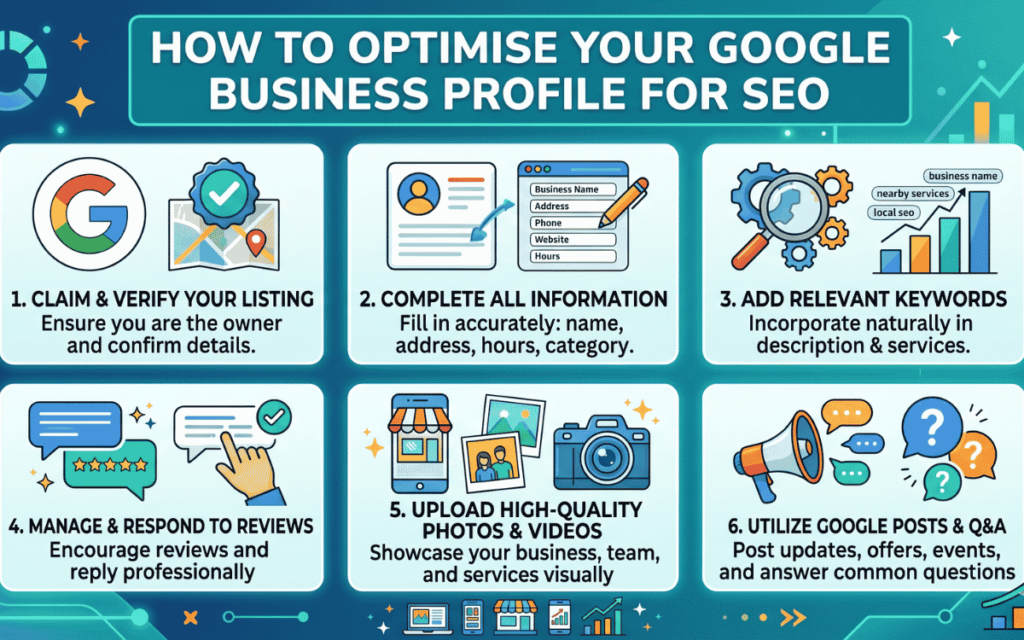
How to Optimise Your Google Business Profile for SEO
Now that we have established that GMB helps SEO, here is how to make the most of it.
Complete Every Section of Your Profile
Fill out every available field. This includes:
- Business name, address, and phone number (NAP)
- Website URL
- Business hours (including holiday hours)
- Business description with relevant keywords
- Products and services list
- Attributes (e.g., “wheelchair accessible,” “free Wi-Fi”)
An incomplete profile is a missed opportunity. Google rewards completeness with better visibility.
Choose the Right Categories
Your primary category is the single most important field in your profile. It tells Google what your business does. Be specific – choose the most accurate category available, then add secondary categories where relevant.
Avoid stuffing your profile with too many categories. A focused, accurate selection performs better than a broad, vague one.
Use High-Quality Images Consistently
Photos matter more than most business owners realise. Businesses with photos receive 42% more requests for directions and 35% more website clicks than those without.
Upload images of:
- Your storefront or office exterior
- Interior spaces
- Team members
- Products or services in action
- Customer interactions (with permission)
Update your photo library regularly. Fresh images signal an active, credible business.
Gather and Respond to Reviews
Reviews are one of the most powerful ranking signals for local SEO. Positive reviews boost your prominence score and build trust with potential customers.
Ask satisfied customers to leave reviews. Make it easy by sending a direct link to your review section. Then, respond to every review – positive and negative alike. Responding shows Google and potential customers that you are engaged and professional.
This ties directly into broader content performance data strategies – the more your audience engages with your brand, the stronger your authority signals become.
Post Regularly
Aim for at least one or two posts per week. Use different post types to keep things varied:
- What’s New – Share updates, announcements, or blog posts.
- Offers – Promote discounts or limited-time deals.
- Events – Highlight upcoming workshops, webinars, or in-person events.
- Products – Showcase specific products with images and descriptions.
Include a clear call to action in every post. Phrases like “Learn More,” “Book Now,” or “Call Today” guide users toward the next step.
Keep Your NAP Consistent
Your business name, address, and phone number must match across every online platform – your website, GBP, social media, and other directories. Inconsistencies confuse both Google and users, which can hurt your local rankings.
This consistency is a core principle of SEO for home service leads and applies equally to any industry trying to rank locally.
Enable Messaging and Booking Features
If available for your business type, enable the messaging and booking features on your GBP. These features allow users to contact or book directly from your listing, increasing conversions and engagement – both of which send positive signals to Google.
Common GMB Mistakes That Hurt Your SEO
Even businesses that have a profile often make critical errors. Avoid these:
- Incorrect business hours – Listing wrong hours frustrates users and damages trust.
- Ignoring reviews – Failing to respond to negative reviews can cost you future customers.
- Using a keyword-stuffed business name – Google penalises fake or spammy business names.
- Neglecting to verify the listing – An unverified profile has limited visibility.
- Never updating the profile – Stale profiles rank lower than active ones.
How SurgeAIO Can Help in Terms of SEO
Managing your Google Business Profile is just one piece of the local SEO puzzle. To compete effectively, you need a comprehensive strategy – one that covers on-page SEO, content, keywords important for SEO, backlinks, and now AI visibility.
SurgeAIO is built for exactly that. It combines traditional SEO tools with cutting-edge AI visibility features, helping businesses track and improve their performance across Google, AI Overviews, and generative search platforms.
Here is how SurgeAIO can help:
- AI Visibility Tracking – Monitor how your brand appears in AI-generated search results, not just traditional rankings. Explore AI visibility metrics to understand where you stand.
- Keyword Research and Gap Analysis – Identify which keywords your competitors rank for that you do not, then build a strategy to close that gap.
- Content Optimisation – Use built-in content tools to create SEO-rich articles, landing pages, and GMB posts that align with search intent.
- Local SEO Intelligence – Track your local pack rankings and get actionable insights to improve your GBP performance.
- Competitor Analysis – Understand what your top local competitors are doing and where you have the opportunity to outperform them.
Whether you are a small business owner managing your own SEO or an agency handling multiple clients, SurgeAIO gives you the data and tools to make smarter decisions. Understanding what SEO and GEO and how they work together is increasingly essential – and SurgeAIO helps you act on that knowledge at scale.
Final Thoughts
Does Google My Business help SEO? Without question, yes. It is one of the highest-impact, lowest-cost tools available for local search visibility. However, its benefits only materialise when you treat it as an active part of your marketing strategy – not a one-time setup.
Verify your profile, complete every section, post consistently, gather reviews, and keep your information accurate. Do these things well, and your GBP becomes a consistent engine for local traffic, leads, and sales.
Combine that with a platform like SurgeAIO, and you have everything you need to dominate local search – and stay ahead as search itself continues to evolve.
Frequently Asked Questions
Q1. Does Google My Business directly affect Google search rankings?
Yes. A well-optimised Google Business Profile improves your chances of appearing in the local 3-pack and Google Maps results. It also sends trust and relevance signals that can positively influence your broader organic rankings.
Q2. How often should I post on Google My Business?
Aim to post at least once or twice per week. Consistent posting keeps your profile active, which Google rewards with better visibility. Even one post per week puts you ahead of the majority of local businesses.
Q3. Do reviews on Google My Business impact SEO?
Absolutely. The quantity, quality, and recency of reviews all factor into your local ranking. Businesses with more positive reviews and active responses tend to rank higher and convert better.
Q4. Is Google My Business free?
Yes, Google Business Profile is completely free to create and manage. However, the time and strategy invested in optimising it can determine whether it generates results or sits idle.
Q5. Can GMB help my business appear in AI Overviews?
Yes. Google increasingly draws from structured business data – including GBP – to populate AI-generated search answers. Keeping your profile accurate and active increases your chances of being featured.
Q6. What is the most important part of a Google Business Profile for SEO?
Your primary category, business description, and reviews are the most influential elements. However, every completed section contributes to your overall profile strength.
