Most marketing plans fail not because the strategy was wrong, but because nobody could actually track whether it was being executed. Searching for an organized marketing plan excel template free download usually means one thing: you want a simple, practical way to turn marketing ideas into a trackable, accountable plan – without paying for expensive software or project management tools.
Excel remains one of the most popular ways to build a marketing plan precisely because it’s flexible, familiar and free. This guide walks through what a strong marketing plan template should include, how to structure it in Excel, and how to avoid the common mistakes that turn even a well-designed spreadsheet into a document nobody actually uses.
Why Use Excel for Your Marketing Plan?
Before diving into project management software, many marketers reach for Excel for good reason. It requires no onboarding, works offline, and gives complete control over structure and formulas without being locked into a specific platform’s rules.
An organized marketing plan Excel template offers several clear advantages:
- No learning curve – most teams already know how to use spreadsheets
- Full customization – build exactly the columns and views your team actually needs
- Easy sharing – compatible across nearly every device and operating system
- Built-in calculations – track budgets, ROI and progress automatically with simple formulas
- No subscription cost – unlike many dedicated marketing planning tools
For small teams or businesses just getting started, a free marketing plan Excel template often does everything a paid tool does, without the added cost or complexity.
Marketing Strategy vs Marketing Plan: Know the Difference First
Before building a template, it helps to understand exactly what you’re organizing. A marketing strategy defines the what and why – your goals, target audience and overall direction. A marketing plan defines the how – specific campaigns, tasks, timelines and budgets that bring that strategy to life.
Your Excel template should primarily serve the plan: the practical, trackable layer that sits beneath your broader strategic direction.
What to Include in an Organized Marketing Plan Excel Template
1. A Goals and KPI Tab
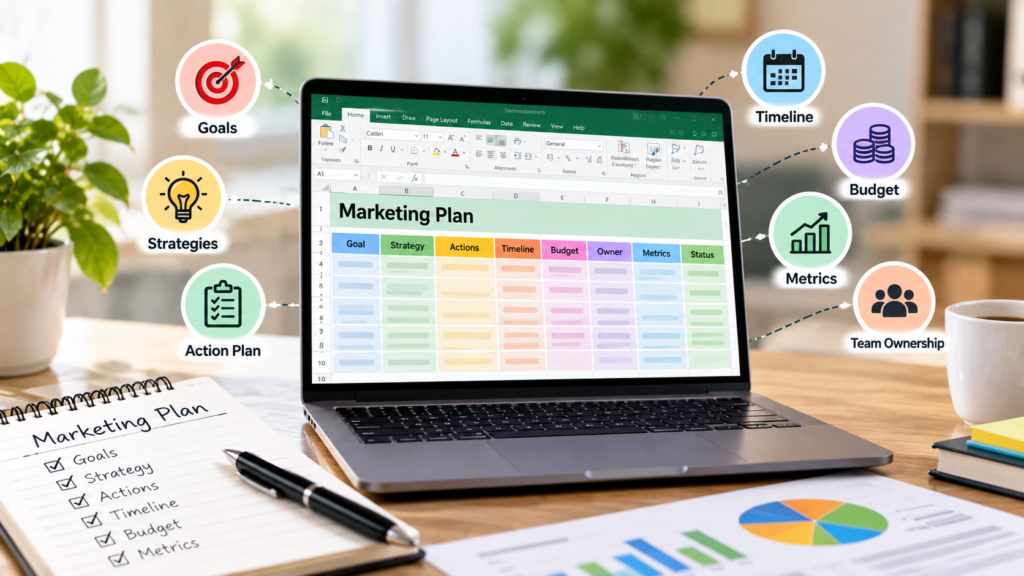
Every effective template starts with a dedicated tab for goals. This should list each objective alongside its target metric, deadline and owner. Using SMART criteria – specific, measurable, achievable, relevant and time-bound – keeps goals from becoming vague aspirations.
Columns to include:
- Goal description
- Target metric (traffic, leads, conversions, revenue)
- Deadline
- Owner
- Current status
2. A Campaign and Task Tracker
This is the operational heart of any organized marketing plan Excel template. Each row should represent a specific task or campaign element, with columns for:
- Task name
- Channel (email, social, SEO, paid ads)
- Owner
- Start date and due date
- Priority level
- Status (not started, in progress, complete)
Color-coding status cells makes it easy to scan progress at a glance without reading every row individually.
3. A Budget Tracker
A separate tab dedicated to budget tracking prevents overspending and shows exactly where marketing dollars are going. Useful columns include planned spend, actual spend, variance, and channel, with a simple formula calculating the difference automatically.
4. A Content and Editorial Calendar
For teams running regular content or campaigns, a calendar tab mapping out publish dates, content type, channel and responsible team member keeps execution organized and prevents last-minute scrambling.
5. A Channel Performance Summary
This tab should pull together high-level results across every channel – email, social, paid and organic – so leadership can see the full picture in one place rather than digging through separate reports.
How to Build Your Own Free Marketing Plan Template in Excel
If you’d rather build your own instead of downloading a pre-made one, these steps create a solid, organized structure quickly:
- Open a new workbook and create separate tabs for Goals, Campaigns, Budget, Calendar and Performance.
- Set up column headers on each tab based on the structure outlined above.
- Apply conditional formatting to status columns so overdue or completed tasks are visually obvious.
- Add simple formulas for budget variance and progress tracking, so totals update automatically.
- Link tabs where useful – for example, referencing campaign budgets on your main budget tracker.
- Review and adjust monthly, refining columns as your team’s actual workflow becomes clearer.
Common Mistakes When Using a Marketing Plan Excel Template
- Overcomplicating the structure with too many tabs and columns no one actually updates
- Mixing strategy and execution on the same tab, making it hard to see the big picture
- Never updating it after the first week, letting the template go stale almost immediately
- Skipping the budget tab entirely, losing visibility into actual versus planned spend
- Not assigning clear owners, leaving tasks without accountability
A simple, consistently updated template will always outperform a complex one that gets abandoned after the first month.
Marketing Plan Template: Excel vs Dedicated Software
| Factor | Excel Template | Dedicated Marketing Software |
| Cost | Free | Often subscription-based |
| Setup time | Minimal | Can require onboarding |
| Customization | Fully flexible | Limited to platform features |
| Collaboration | Basic (shared files, cloud sync) | Often built-in, real-time |
| Automation | Manual formulas | Built-in workflows and alerts |
For small teams or early-stage businesses, a free organized marketing plan Excel template is usually more than sufficient. Larger teams managing complex, multi-channel campaigns may eventually outgrow a spreadsheet and benefit from dedicated software instead.
Don’t Forget SEO in Your Marketing Plan Template
One of the most common gaps in downloaded marketing plan templates is a dedicated section for organic search. Many marketers default to planning around paid ads and social media, overlooking the long-term value of SEO. Since SEO is largely considered organic marketing rather than paid advertising, it deserves its own tracked line item, not an afterthought squeezed into a “miscellaneous” tab.
Before filling in your SEO tasks, it’s worth understanding which keywords matter most for your business, since this directly shapes what content and campaigns belong on your calendar. A solid competitive analysis of keywords tab can even be added alongside your existing campaign tracker to guide content priorities each quarter.
Why Your Excel Template Still Needs an SEO Line Item

SEO behaves differently from most other channels tracked in a marketing plan. It builds gradually, so understanding how long SEO typically takes to show results helps set realistic timelines in your plan rather than expecting the same speed as a paid campaign. Including a dedicated SEO section, with its own goals, tasks and content performance tracking, ensures this long-term channel doesn’t get deprioritized simply because it lacks the instant visibility of paid ads.
Practical Checklist for Your Marketing Plan Excel Template
- Separate strategic goals from day-to-day execution tasks
- Include a dedicated budget tracker with planned vs actual spend
- Add a content or editorial calendar tab for consistency
- Assign a clear owner to every task and campaign
- Include organic search and SEO as a standalone tracked channel
- Review and update the template monthly, not just once at launch
How SurgeAIO can help in terms of SEO
Downloading an organized marketing plan Excel template is a great first step, but the SEO section of that plan only delivers results if it’s built on the right strategy. SurgeAIO helps businesses fill that gap with organic growth strategies designed to compound over time.
For businesses weighing whether to handle SEO in-house or bring in outside expertise, understanding the basics of hiring an SEO company and typical SEO service costs makes it easier to budget this line item accurately within your plan. From there, organic traffic strategies built around real search intent give your marketing plan a channel that keeps delivering results long after a single campaign ends.
As search behavior shifts toward AI-driven discovery, SurgeAIO also helps businesses understand how to rank in AI Overviews, ensuring your marketing plan accounts for where search is actually headed, not just where it’s been.
Final Thoughts
An organized marketing plan Excel template free download can give any business a practical, accountable way to turn marketing ideas into trackable execution, without the cost of dedicated software. The key isn’t finding the fanciest template; it’s keeping the structure simple enough that your team actually updates it. Build it around clear goals, trackable tasks, a real budget tracker, and don’t forget to give organic search the dedicated attention it deserves alongside every other channel in your plan.
Frequently Asked Questions
1. Is a free marketing plan Excel template good enough for a small business?
Yes. For most small teams, a well-structured Excel template covers everything needed to plan, track and budget marketing activities without the cost of dedicated software.
2. What tabs should an organized marketing plan Excel template include?
At minimum, include tabs for goals and KPIs, a campaign and task tracker, a budget tracker, a content calendar, and a channel performance summary.
3. Can Excel handle marketing budget tracking effectively?
Yes. Simple formulas comparing planned versus actual spend, combined with conditional formatting, make Excel a capable and free budget-tracking tool for most marketing teams.
4. Should SEO have its own section in a marketing plan template?z
Yes. SEO behaves differently from paid channels, building results gradually over time, so it deserves a dedicated, clearly tracked section rather than being bundled into general tasks.
5. When should a business move from Excel to dedicated marketing software?
Once campaigns span many channels and multiple team members need real-time collaboration, dedicated software with built-in automation often becomes more efficient than a shared spreadsheet.
