
If you run a website, you’ve probably heard that blogging helps SEO. But have you ever asked a deeper question – does the blogging platform itself affect your website SEO? The answer is yes, and it matters more than most people realize.
Your choice of blogging platform shapes how search engines crawl, index, and rank your content. From page speed to URL structure to internal linking flexibility, the platform you pick sets the foundation for every SEO effort you make.
In this guide, we’ll break down exactly how blogging platforms affect website SEO – and what you can do to make the most of whichever platform you use.
Why Blogging Still Matters for SEO in 2026
Before diving into platforms, let’s be clear: blogging remains one of the most powerful SEO tools available. Every new blog post you publish creates a new indexed page. That means more entry points for users to find your site through search.
Moreover, consistent blogging lets you target long-tail keywords your main pages might miss. It builds topical authority over time. It also creates natural opportunities for targeting the keywords important for SEO that your competitors may be overlooking.
However, none of this matters if your blogging platform creates technical barriers. A poor platform can slow down your pages, generate messy URLs, block crawlers, or limit your SEO customization. That’s why your platform choice directly influences your results.
What Makes a Blogging Platform SEO-Friendly?
Not all blogging platforms are built the same. Some give you full control over your SEO settings, while others are quite restrictive. Here are the key factors that determine whether a platform is good for SEO:
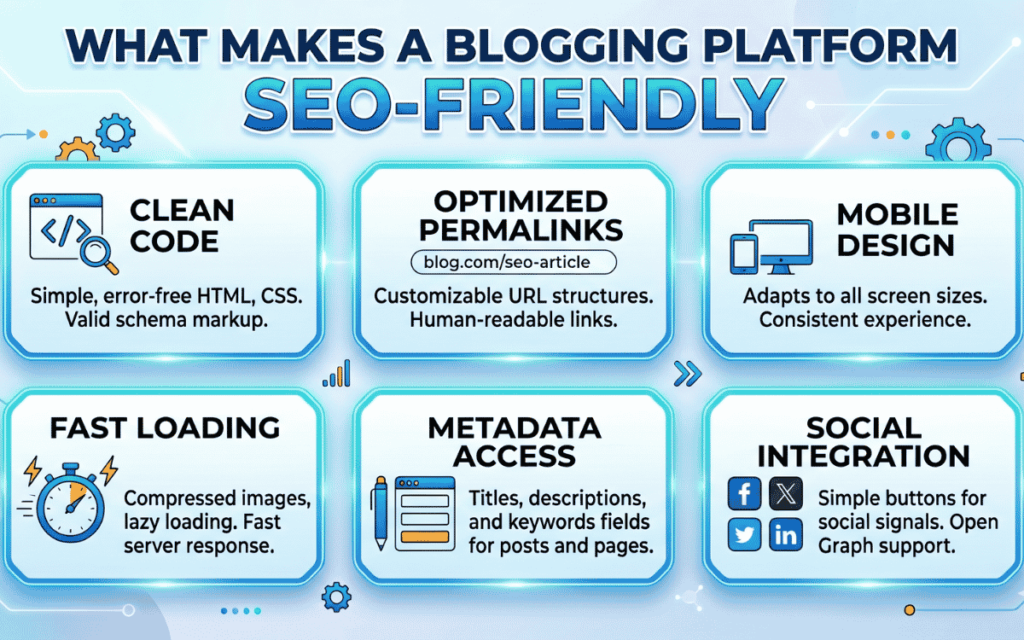
- Page load speed – Slow pages hurt your rankings. Google considers speed a core ranking signal.
- Mobile responsiveness – Search engines prioritize mobile-first indexing. Your blog must look great on all devices.
- URL structure – Clean, readable URLs help both users and search engines understand your content.
- Customizable meta tags – You need to control your title tags and meta descriptions for every post.
- Schema markup support – Structured data helps search engines interpret your content more accurately.
- Internal linking flexibility – The platform should let you link freely across your content.
- Indexability controls – You should be able to set canonical tags, noindex pages, and sitemaps without workarounds.
When a platform ticks all these boxes, your blogging efforts translate directly into SEO gains.
How Different Blogging Platforms Affect SEO
WordPress
WordPress is the most widely used blogging platform – and for good reason. It offers near-total control over your SEO setup. Plugins like Yoast SEO or Rank Math let you customize meta tags, sitemaps, schema, and more. You can control your URL structure, optimize images, and improve load speed through caching plugins.
Therefore, WordPress tends to perform well for SEO when configured properly. The downside? You need some technical know-how to manage it. However, for businesses serious about content performance data and organic growth tracking, WordPress remains the gold standard.
Shopify
Shopify is popular for e-commerce, but many users also maintain blogs on it. The platform handles basic SEO well – it auto-generates sitemaps and supports meta tag customization. However, Shopify has some limitations. URL structures for blogs are fixed, often including “/blogs/news/” in the path, which isn’t always ideal. Also, duplicate content issues can arise if you’re not careful.
If you’re wondering if Shopify is good for SEO, the answer is: good enough for e-commerce, but not the most flexible for content-heavy SEO strategies.
Squarespace
Squarespace offers a clean interface and decent built-in SEO features. However, it gives you less control compared to WordPress. You can edit meta titles and descriptions, but advanced customizations – like custom schema or server-side redirects – are limited. Page speed can also be an issue, depending on the template you use.
For businesses wondering WordPress or Squarespace is better for SEO, WordPress generally wins for flexibility and control. Squarespace works well for small blogs or personal sites where deep SEO customization isn’t a priority.
Wix
Wix has significantly improved its SEO capabilities over the years. It now supports custom meta tags, structured data, and mobile-optimized templates. However, its JavaScript-heavy rendering can still cause crawlability issues for some search engines. URL structures are also less customizable compared to WordPress.
Medium and Substack
These platforms are good for building an audience quickly, but they’re poor choices for building your own SEO authority. Content published on Medium or Substack builds domain authority for those platforms – not your website. In addition, you have limited control over technical SEO settings. If SEO is a priority, these platforms should only supplement your main website, not replace it.
The Role of CMS in Your SEO Strategy
Your CMS is not just a publishing tool – it’s a strategic SEO decision. The right CMS for SEO and content optimization allows you to publish fast, optimize thoroughly, and scale your content without hitting technical walls.
A good CMS helps you:
- Build a logical content hierarchy that search engines can crawl easily
- Create and manage content for local landing pages for SEO without custom development
- Maintain clean URL structures across hundreds of blog posts
- Manage redirects and canonical tags without touching code
Ultimately, your CMS either empowers your SEO or limits it. Choose accordingly.
How Platform Choice Affects Internal Linking
Internal linking is one of the most underrated SEO tactics. It distributes link equity, helps users navigate your site, and signals to search engines which pages are most important.
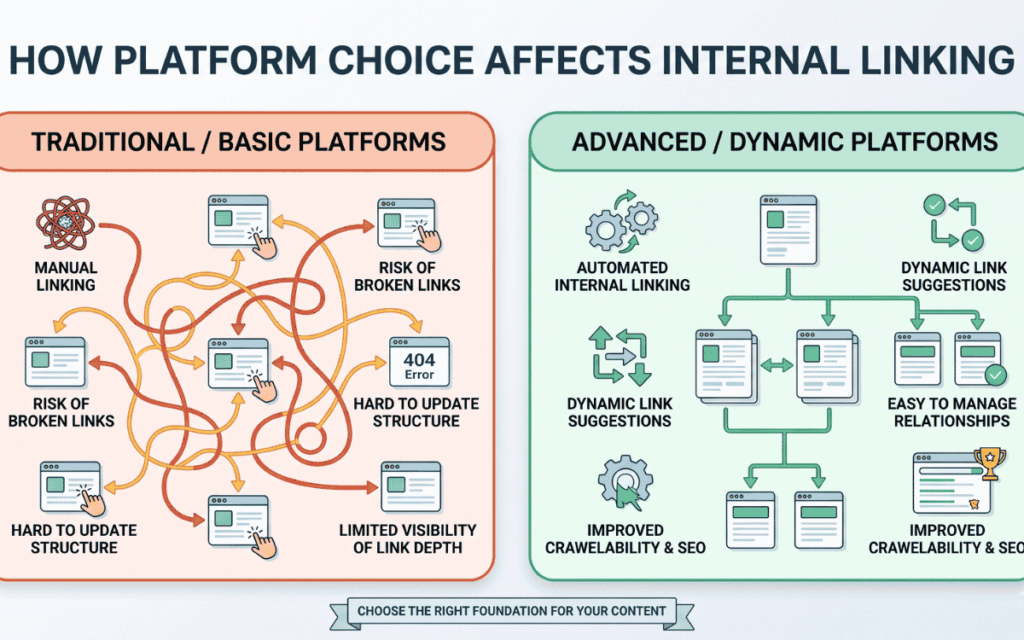
However, some blogging platforms make internal linking unnecessarily difficult. Platforms with poor editors or rigid templates limit your ability to link naturally within content. WordPress, on the other hand, gives you full freedom to link wherever it makes sense.
A strong internal linking structure connects your blog posts to your service pages, product pages, and other high-value content. This becomes especially important when running competitive analyses of keywords – where you want to funnel authority toward the pages you most want to rank.
Platform Speed and Core Web Vitals
Google’s Core Web Vitals measure how fast and stable your pages are. These metrics directly affect your rankings. Your blogging platform plays a huge role here.
Some platforms load heavy scripts by default, use unoptimized image handling, or rely on bloated templates. All of this slows down your site. Faster platforms – or faster configurations of flexible platforms – give you a significant SEO edge.
Therefore, when evaluating a platform, always test its speed using tools like Google PageSpeed Insights or GTMetrix. A blog post that loads in 1.5 seconds will always outrank one that takes 5 seconds – even if the content is identical.
Mobile Optimization and SEO
Google uses mobile-first indexing. This means it evaluates the mobile version of your site first when deciding how to rank it. If your blogging platform produces poor mobile experiences, your SEO will suffer – regardless of how well-written your posts are.
Look for platforms that use responsive templates by default. Test your blog on mobile devices regularly. Make sure images resize correctly, text is readable without zooming, and buttons are easy to tap. Following best practices for AI visibility SEO also means ensuring your content is accessible and fast on every device.
URL Structure and Permalink Settings
Your blog post URLs tell search engines what the page is about. A clean URL like /blog/how-blogging-platforms-affect-seo is far better than /p=1234 or /blog?id=abc.
Some platforms give you full control over permalinks. Others assign auto-generated URLs that are hard to change later. WordPress lets you choose your URL structure from the settings panel. Shopify adds fixed prefixes. Squarespace gives moderate control.
Always configure your URLs to include the target keyword. Keep them short, descriptive, and free of unnecessary parameters.
Schema Markup and Structured Data
Schema markup helps search engines understand your content and display it in rich results – like featured snippets, FAQs, or how-to results. Not all blogging platforms support schema markup out of the box.
WordPress supports schema through SEO plugins. Some other platforms require custom code or third-party tools. Understanding what is LLM in SEO and how AI-driven search reads your content is becoming a critical part of platform selection. If you want to appear in AI overviews and featured snippets, structured data is no longer optional.
How SurgeAIO Can Help in Terms of SEO
Choosing the right blogging platform is just the first step. The bigger challenge is making sure every blog post you publish is fully optimized – from keyword targeting to content structure to internal linking.
SurgeAIO simplifies this entire process. Here’s how it helps:
- Keyword research and tracking – Identify the right keywords for each blog post and monitor your rankings over time.
- Content optimization – Get actionable recommendations to improve your blog content before you publish.
- AI visibility monitoring – Track how your content appears in AI-powered search results and generative engine responses.
- Internal link suggestions – Identify the best linking opportunities across your blog to strengthen your site structure.
- Competitor analysis – See what’s working for your competitors and find content gaps you can fill.
Whether you’re using WordPress, Shopify, or any other platform, SurgeAIO gives you the data and tools to make every blog post count. It removes the guesswork from SEO and helps you build a content strategy that delivers consistent, measurable results.
Best Practices for Blogging Platforms and SEO
No matter which platform you use, these practices will strengthen your blogging SEO:
- Publish consistently – Regular content signals to search engines that your site is active and relevant.
- Optimize every post – Always include your target keyword in the title, first paragraph, and at least one subheading.
- Use short, clear paragraphs – Readability matters for both users and search engine crawlers.
- Add alt text to all images – This helps search engines index your visual content and improves accessibility.
- Link internally and externally – Internal links build site structure; external links add credibility.
- Monitor your performance – Use tools to track rankings, click-through rates, and organic traffic regularly.
- Avoid duplicate content – Make sure your platform doesn’t auto-generate duplicate pages for tags, categories, or archives.
Final Thoughts
How blogging platforms affect website SEO is not a minor detail – it’s a foundational decision that shapes every SEO effort that follows. The right platform gives you the tools to publish fast, optimize deeply, and grow your organic presence over time.
Whether you’re just starting or planning a platform switch, take platform capabilities seriously. Evaluate speed, flexibility, and SEO controls before committing. And once you’ve chosen your platform, make sure every blog post is optimized to its fullest potential.
With the right platform and the right strategy, your blog becomes one of the most powerful assets in your entire SEO arsenal.
Frequently Asked Questions
Q1: Does the blogging platform really affect my Google rankings?
Yes, significantly. Your platform controls critical technical factors like page speed, URL structure, crawlability, and schema markup support. All of these directly influence how Google evaluates and ranks your content. A poorly optimized platform can hold back even your best blog posts.
Q2: Which blogging platform is best for SEO?
WordPress is widely considered the best blogging platform for SEO. It offers unmatched flexibility, a powerful plugin ecosystem, and full control over technical settings like meta tags, sitemaps, and structured data. For businesses serious about organic growth, WordPress provides the strongest SEO foundation available.
Q3: Can I do SEO on Squarespace or Wix?
Yes, but both platforms come with notable limitations. They support basic SEO functions like meta titles and mobile-friendly templates. However, they restrict advanced customizations such as custom schema markup, server-side redirects, and granular URL control. For deeper SEO strategies, these platforms may slow your progress.
Q4: Does blogging on a subdomain hurt SEO?
It can, and here’s why. Google may treat a subdomain like blog.yoursite.com as an entirely separate website. This means your blog content won’t pass authority back to your main domain. Using a subfolder structure like yoursite.com/blog/ is the safer, more SEO-friendly choice for most websites.
Q5: How often should I publish blog posts for SEO?
Consistency matters far more than posting frequency. Starting with two to four quality posts per month is a strong and sustainable approach. Focus on producing well-researched, valuable content rather than rushing to publish thin articles. Search engines reward consistent, high-quality output over time.
Q6: Can I switch platforms without losing my SEO rankings?
Yes, but the migration must be handled with great care. You need to implement proper 301 redirects for every URL to preserve your existing rankings and link equity. Maintaining your URL structure as closely as possible also minimizes ranking drops. A poorly executed migration can undo months or even years of SEO work, which is why understanding SEO for a site migration is critical before making any platform switch.
