Most website owners obsess over keywords, backlinks, and meta descriptions. However, they often overlook one small but powerful detail – image file names. If you want to squeeze every bit of SEO value out of your content, you need to know how to name images for SEO the right way.
Google uses image filenames as one of the signals to understand what an image is about. A file named IMG_4839.jpg tells Google nothing. However, a file named red-running-shoes-nike.jpg tells a very clear story. This seemingly small step can improve your rankings in both Google Images and standard search results.
In this guide, we’ll walk you through everything – from the basics of image naming to alt text, captions, file formats, and more.
Why Image File Names Matter for SEO
Search engines can’t “see” images the way humans do. Therefore, they rely on textual signals – like the filename, alt text, and surrounding content – to understand what’s inside an image.
According to Google’s own documentation, filenames give search engines “light clues” about the subject matter of an image. While it’s not the most powerful ranking factor, it is a consistent one. Moreover, proper image naming contributes to overall on-page SEO best practices, which stack up over time.
Here’s why image naming matters:
- It helps Google crawl and index your images correctly.
- It can drive additional traffic through Google Images searches.
- It improves accessibility for users with visual impairments.
- It supports page relevance signals for your target keywords.
When combined with other SEO efforts, well-named images contribute to stronger overall content performance data and better rankings.
The Golden Rules for Naming Images for SEO
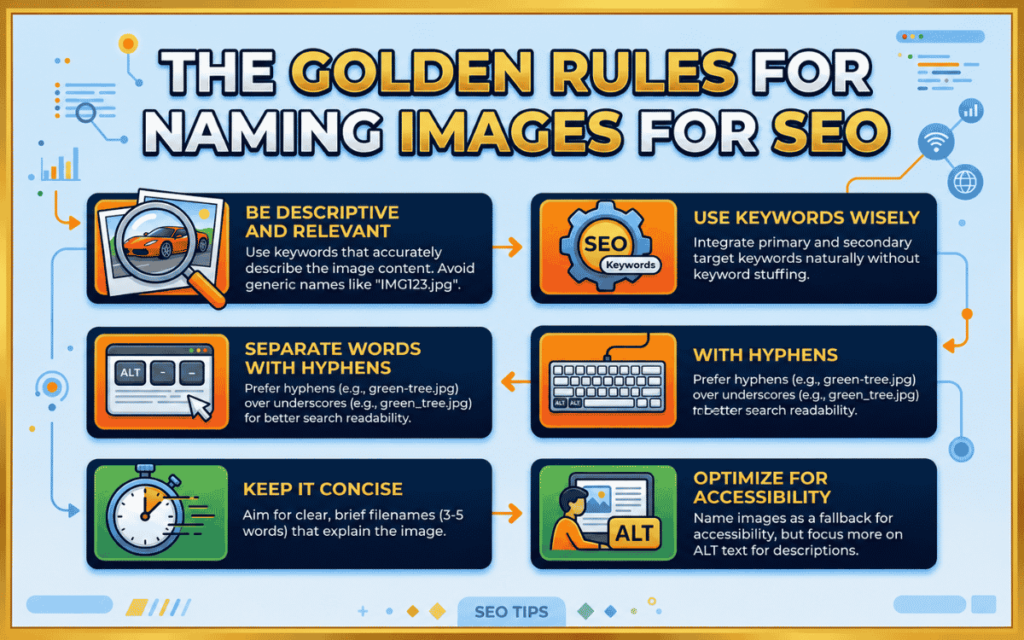
1. Use Descriptive, Keyword-Rich File Names
The most important rule is to use descriptive names that reflect the actual content of the image. Avoid generic defaults like image1.jpg, screenshot.png, or photo.gif.
Instead, describe what’s in the image. For example:
- Bad: DSC_00198.jpg
- Better: shoes.jpg
- Best: blue-leather-oxford-shoes.jpg
You don’t need to force your primary keyword into every image name. However, if the image is genuinely relevant to your focus keyword, including it naturally makes sense.
2. Keep File Names Short
Google recommends keeping filenames “short but descriptive.” Aim for 3 to 5 words. Overly long filenames can look spammy and dilute the value of the key terms.
For example:
- Too long: best-affordable-blue-leather-oxford-shoes-for-men-2024.jpg
- Just right: blue-leather-oxford-shoes.jpg
This also aligns with how many SEO keywords per page guidance – quality over quantity always wins.
3. Use Hyphens to Separate Words
Always use hyphens (-) to separate words in your image filenames. Google treats hyphens as word separators, whereas underscores (_) are not treated the same way.
- Correct: strawberry-ice-cream.jpg
- Incorrect: strawberry_ice_cream.jpg
- Also incorrect: strawberryicecream.jpg
This is a small technical detail, but it ensures Google reads each word clearly and indexes the image for the right search queries.
4. Use Lowercase Letters Only
Always name your images in lowercase. Some servers are case-sensitive, and uppercase letters in filenames can cause broken images or indexing issues.
- Correct: chocolate-birthday-cake.jpg
- Incorrect: Chocolate-Birthday-Cake.jpg
5. Never Stuff Keywords
Do not stuff multiple keywords into a single image filename. Google considers this spam, and it can actually harm your SEO rather than help it.
- Spammy: best-seo-blog-content-keyword-optimization-tips-2024.jpg
- Clean: seo-blog-optimization.jpg
Keyword stuffing in image names is no different from stuffing keywords in content – both are penalized. Focus on relevance, not repetition.
How to Write SEO-Friendly Alt Text
Alt text (alternative text) is the written description that appears when an image fails to load. It also helps screen readers describe images to visually impaired users. More importantly, it gives Google a clear context about your image.
Google uses alt text, along with computer vision algorithms and surrounding page content, to understand the subject of an image.
Here’s how to write good alt text:
- Be descriptive and specific. Describe exactly what’s in the image.
- Include your target keyword naturally – but only if it’s genuinely relevant.
- Avoid stuffing multiple keywords into the alt attribute.
- Keep it under 125 characters.
Examples:
- Bad (missing): <img src=”puppy.jpg”/>
- Bad (stuffed): <img src=”puppy.jpg” alt=” puppy dog baby dog pup litter puppies dog food cheap”/>
- Good: <img src=”golden-retriever-puppy.jpg” alt=”Golden retriever puppy playing in green grass”/>
Well-crafted alt text supports your overall SEO and GEO strategy for your website, helping search engines understand both the image and the page context together.
Image Titles and Captions: Often Ignored, Always Useful
Many site owners skip image titles and captions entirely. However, Google explicitly states it extracts information from captions and image titles when determining relevance.
Image titles appear when a user hovers over an image. They provide brief additional context. Example: “Golden Retriever Puppy in Summer Park”
Captions appear below images and are visible to readers. They are among the most-read texts on a webpage after headlines. A well-written caption reinforces the image’s subject and keeps users engaged.
You don’t need to add captions to every image. However, when an image is central to your content, a caption adds both clarity and SEO value.
Choose the Right Image File Format
Google supports several image formats: JPEG, PNG, WebP, GIF, BMP, SVG, and AVIF. Each has a different use case:
- JPEG: Best for photographs with many colors. Good compression, smaller file sizes.
- PNG: Best for logos, screenshots, or images that need transparency.
- WebP: Modern format with superior compression and quality. Recommended by Google.
- SVG: Best for icons and vector graphics. Scales without losing quality.
Make sure the file extension matches the actual file format. For example, don’t save a PNG file as .jpg. This can confuse crawlers and cause rendering issues.
Additionally, always make sure the file extension is in lowercase – .jpg, not .JPG.
Image Size and Page Speed
Even perfectly named images can hurt your SEO if they’re too large. Page speed is a confirmed Google ranking factor. Oversized images slow down page load times, leading to higher bounce rates and lower rankings.
Best practices for image size:
- Compress images before uploading using tools like TinyPNG, Squoosh, or ShortPixel.
- Use the WebP format for smaller file sizes without quality loss.
- Set proper dimensions so the browser doesn’t need to scale images.
- Use lazy loading so images below the fold load only when needed.
Faster pages also tend to rank better in AI overviews and modern search results, where page experience signals play an increasingly important role.
Use an Image Sitemap
An image sitemap tells Google about all the images on your website, including those that might not be easily discovered through regular crawling. This is particularly useful for images loaded via JavaScript or hosted on a CDN.
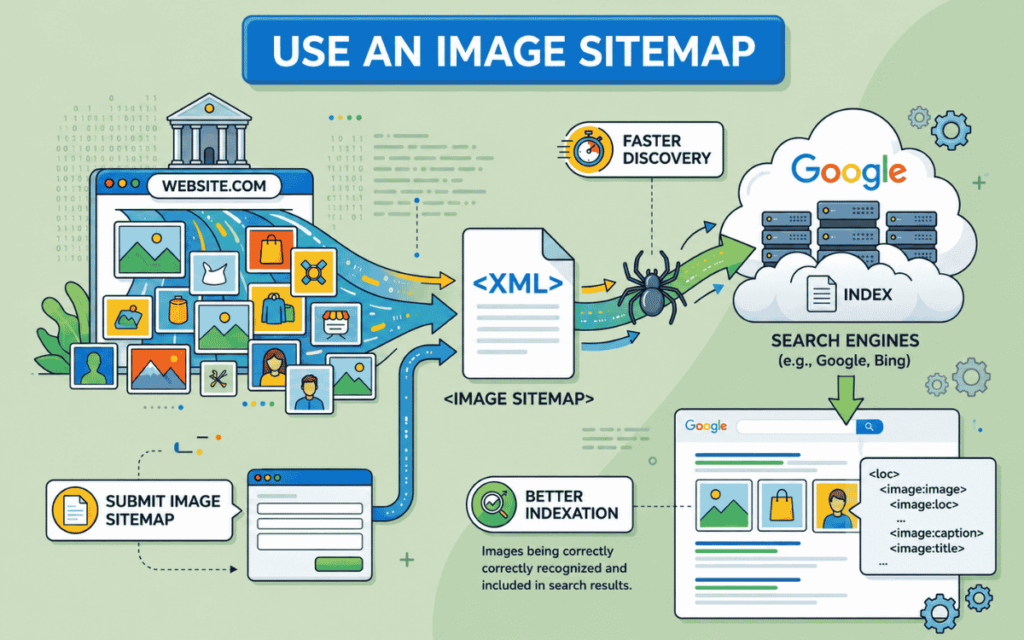
You can submit an image sitemap through Google Search Console. Including image URLs in your sitemap improves the chances of Google indexing and ranking your images. This is an often-overlooked tactic that connects directly to how important a sitemap is for SEO.
Contextual Placement Matters
Where you place an image on a page affects how Google interprets it. Google tries to associate an image with the surrounding text. Therefore, always place images near the relevant content they support.
For example, if you write about a product, place the product image next to the section describing it – not at the top or bottom of an unrelated section.
Additionally, use consistent image URLs. If the same image appears on multiple pages, reference it with the same URL every time. This helps Google cache and reuse the image efficiently without re-crawling.
Structured Data for Images
Adding structured data (schema markup) to your pages helps Google display rich results – including image badges – in search results. This can significantly improve click-through rates.
For images, you can use schema.org’s ImageObject type or the primaryImageOfPage property. Additionally, using the og:image meta tag helps Google select the right image when displaying your content in search results and on social platforms.
This kind of technical optimization ties into broader best content optimization tools for SEO strategies that help content stand out in competitive SERPs.
Quick Checklist: How to Name Images for SEO
Use this checklist before uploading any image to your website:
- [ ] Does the filename describe what’s in the image?
- [ ] Is the filename 3-5 words long?
- [ ] Are words separated by hyphens?
- [ ] Is the filename in lowercase?
- [ ] Does it include a relevant keyword naturally (without stuffing)?
- [ ] Is the alt text descriptive and concise?
- [ ] Is the image compressed and fast-loading?
- [ ] Is the file format appropriate (WebP, JPEG, PNG)?
- [ ] Is the file extension lowercase and matching the format?
- [ ] Is the image placed near relevant content?
How SurgeAIO Can Help in Terms of SEO
Naming images correctly is just one piece of the puzzle. Building a complete, high-performing SEO strategy requires tracking many moving parts – from keyword rankings and content performance to technical audits and AI visibility.
SurgeAIO is an all-in-one SEO platform designed to help businesses and marketers execute smarter SEO strategies with less manual effort. Here’s how SurgeAIO can support your image SEO and overall optimization goals:
Content Optimization: SurgeAIO helps you identify which pages and content assets need improvement. This includes flagging images with missing alt text, poor filenames, and oversized assets – so you can fix them fast.
Keyword Intelligence: Understand which keywords matter most for your images and content. SurgeAIO’s keyword tools help you find the right terms to naturally embed in your image filenames and alt attributes.
AI Visibility Tracking: With AI-driven search evolving rapidly, SurgeAIO helps you monitor how your content – including visual assets – appears across AI overviews and generative search results. This is critical as more users discover content through AI-powered responses.
Technical SEO Audits: SurgeAIO runs deep technical audits to identify image-related issues: broken image links, missing alt text, slow-loading assets, and improper file formats.
Competitor Analysis: See how your competitors are optimizing their visual content and identify gaps in your own strategy using SurgeAIO’s competitive tools.
Whether you’re a small business, an e-commerce store, or a large enterprise, SurgeAIO provides the data and insights you need to turn every image into an SEO asset – not just a visual placeholder.
Final Thoughts
Learning how to name images for SEO is a simple but often neglected practice. A few seconds of thought before you upload an image can improve your visibility in both traditional and image search results.
To recap: use short, descriptive, hyphenated, lowercase filenames. Write relevant alt text. Add captions where helpful. Choose the right file format. And compress your images for speed.
These steps don’t require expensive tools or advanced technical skills. However, when implemented consistently across your entire website, they create a measurable SEO advantage. Moreover, pairing smart image optimization with a platform like SurgeAIO gives you the full picture insights needed to stay ahead of the competition.
Frequently Asked Questions
Q1. Does the image file name directly affect Google rankings?
Image filenames are a light ranking signal, not a major one. However, they contribute to how well Google understands your image. Combined with alt text and contextual placement, descriptive filenames help search engines index your images more accurately.
Q2. Should I rename existing images on my website?
Yes, if your current images have generic names like IMG_001.jpg, it’s worth renaming them. However, if images are already indexed, renaming them changes the URL. Make sure to set up proper redirects or update internal references to avoid broken links.
Q3. How many keywords should I include in an image filename?
Ideally, use one primary keyword naturally within a 3–5 word filename. Avoid stuffing multiple keywords, as Google considers this spam. Think of the filename as a short description, not a keyword list.
Q4. Is alt text the same as an image filename?
No. The filename is what you name the image file before uploading (e.g., golden-retriever-puppy.jpg). Alt text is a separate HTML attribute added in your CMS or code that describes the image for search engines and screen readers. Both are important for image SEO.
Q5. What is the best image format for SEO?
WebP is currently the best image format for SEO because it offers superior compression with high quality, resulting in faster page loads. Google recommends WebP for modern websites. JPEG remains a reliable fallback for photographs, while PNG is better for graphics that require transparency.
Q6. Do image captions affect SEO?
Image captions don’t directly influence rankings in the same way alt text does, but they provide helpful context to both users and search engines. Captions are often the most-read text on a page after headlines, so they contribute to user engagement and page relevance.
Q7. Should every image have alt text?
Yes – every meaningful image on your page should have descriptive alt text. Purely decorative images can use an empty alt=”” attribute to signal to screen readers that the image is not content-relevant.
