Some SEO elements are visible and celebrated – content, backlinks, and keyword rankings. Others work quietly in the background, keeping the entire system running. A sitemap is firmly in the second category.
If you’ve ever wondered how important is a sitemap for SEO, the answer is more nuanced than a simple yes or no. Sitemaps are not a magic ranking boost – but without one, your website risks being crawled inefficiently, indexed incompletely, and left behind by competitors whose pages search engines can find and process without friction.
This guide explains what sitemaps are, why they matter, how they’ve evolved in 2026, and what best practices ensure yours is working as hard as possible for your site.
What Is a Sitemap?
A sitemap is a file that lists all the important URLs on your website, along with additional metadata about each page. That metadata typically includes:
- Last modified date – when the page was last updated
- Change frequency – how often the page is expected to change
- Priority – the relative importance of a page compared to others on the site
Think of a sitemap as a roadmap you hand directly to search engines. Instead of forcing Google’s crawlers to discover every page by following links, you present a clear, organised list of exactly what exists on your site and what matters most.
This becomes especially critical for large websites, newly launched sites with few inbound links, and pages that are buried deep within a site’s architecture – where crawlers might never naturally reach them.
Types of Sitemaps
Not all sitemaps are the same. Different types serve different purposes depending on your content and goals.
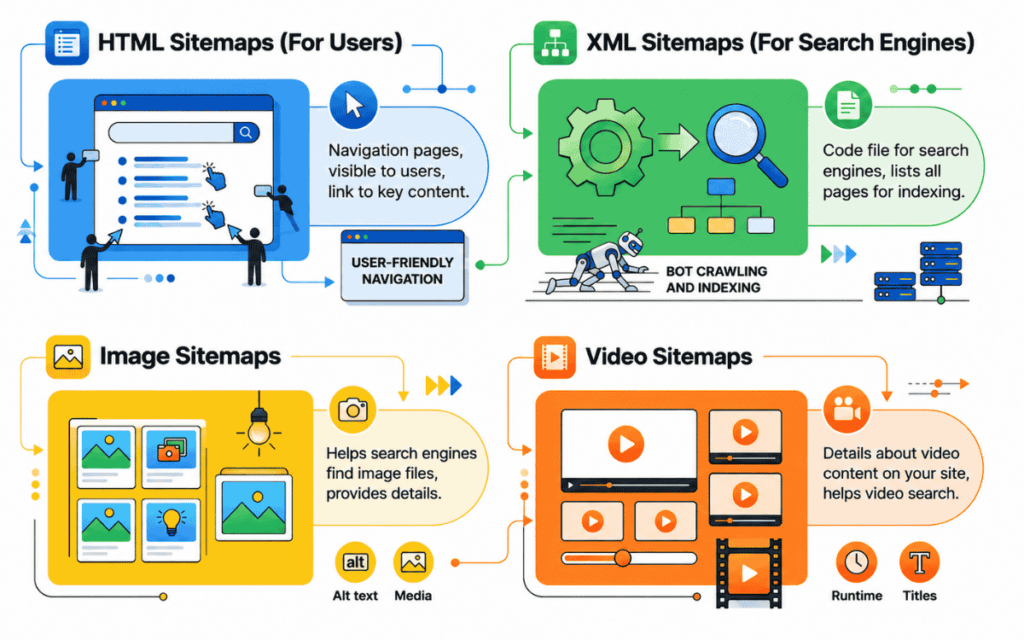
XML Sitemap – The most common type. It lists your key page URLs and metadata in a format designed for search engine crawlers. Most SEO discussions refer to this type by default.
HTML Sitemap – A user-facing page that lists your site’s pages in a readable format. It helps visitors navigate your site and provides an additional internal linking structure for crawlers.
Image Sitemap – Helps search engines discover and index images on your site. Particularly valuable for e-commerce platforms, photography portfolios, and image-heavy websites.
Video Sitemap – Enables search engines to index video content efficiently. Essential for tutorial sites, product demonstration pages, and media publishers.
News Sitemap – Required for sites participating in Google News. Ensures time-sensitive articles are indexed rapidly and appear in news search results.
Each type plays a distinct role in ensuring comprehensive coverage of your website by search engines. For most businesses, the XML sitemap is the priority – but adding image or video sitemaps where relevant adds another layer of indexing strength.
How Important Is a Sitemap for SEO? The Real Answer
Sitemaps do not directly improve your rankings. Google has confirmed this. However, they significantly improve your website’s ability to be crawled and indexed efficiently – and without indexing, ranking is impossible.
Here’s why sitemaps matter for SEO in practical terms:
1. Faster Discovery of New and Updated Pages
When you publish a new page or update existing content, you want Google to find it quickly. Without a sitemap, crawlers must discover new content by following internal links – a process that can take days or even weeks.
With a sitemap, you actively notify search engines about new or updated URLs. This accelerates the indexing process considerably, which matters most for time-sensitive content like news, product launches, or promotional pages.
2. Better Crawl Budget Management
Search engines allocate a finite amount of crawling resources to each website – known as crawl budget. For large sites with hundreds or thousands of pages, crawlers cannot visit every URL in every crawl cycle.
A well-configured sitemap helps direct crawl budget toward your highest-priority pages. This ensures your most important content gets indexed consistently, rather than wasted crawl resources being spent on low-value or duplicate URLs.
This is a key reason why technical SEO and CMS platform choice both influence sitemap performance – the platform you build on determines how easily sitemaps are generated, maintained, and submitted.
3. Surfacing Orphan Pages
An orphan page is a page with no internal links pointing to it. Crawlers discover pages primarily by following links – so orphan pages are essentially invisible to search engines without a sitemap.
A comprehensive XML sitemap ensures that even orphan pages get submitted for indexing. This is particularly valuable during site rebuilds, content migrations, or when launching large batches of new content simultaneously.
4. Supporting Complex Site Architectures
E-commerce sites, news portals, and content-heavy platforms often have thousands of pages organised across complex hierarchical structures. Even the most sophisticated crawlers can miss pages when site architecture becomes dense.
A sitemap cuts through that complexity. It provides a direct inventory of everything that exists – eliminating guesswork for search engine bots and ensuring no critical page gets overlooked.
What Has Changed with Sitemaps in 2026?
Sitemaps have evolved significantly since their introduction in 2005. Back then, they were critical simply because search engines were far less capable of discovering and indexing content independently.
Today, Google and other search engines use machine learning, link analysis, and content recognition to crawl the web with far greater sophistication. However, sitemaps have not become redundant – they’ve become smarter and more multifunctional.
In 2026, sitemaps serve multiple roles beyond pure SEO:
- UX designers use visual sitemaps to plan site architecture before wireframing and development begin
- Content managers use sitemaps to prioritise which pages need to be created or updated first
- Marketers use sitemaps to understand content flow and identify gaps in topic coverage
- Developers use sitemaps to plan workload estimates for new site builds
Additionally, as AI-driven search continues to reshape how pages are discovered and evaluated, sitemaps play a supporting role in ensuring that content is structured and accessible in ways that AI crawlers can process efficiently. Understanding what elements are foundational for SEO with AI makes it clear that technical accessibility – including sitemap health – underpins everything else.
Sitemap Best Practices for SEO
Having a sitemap is the first step. Optimising it is what separates strong technical SEO from average performance.
Follow these best practices to get the most from your sitemap:
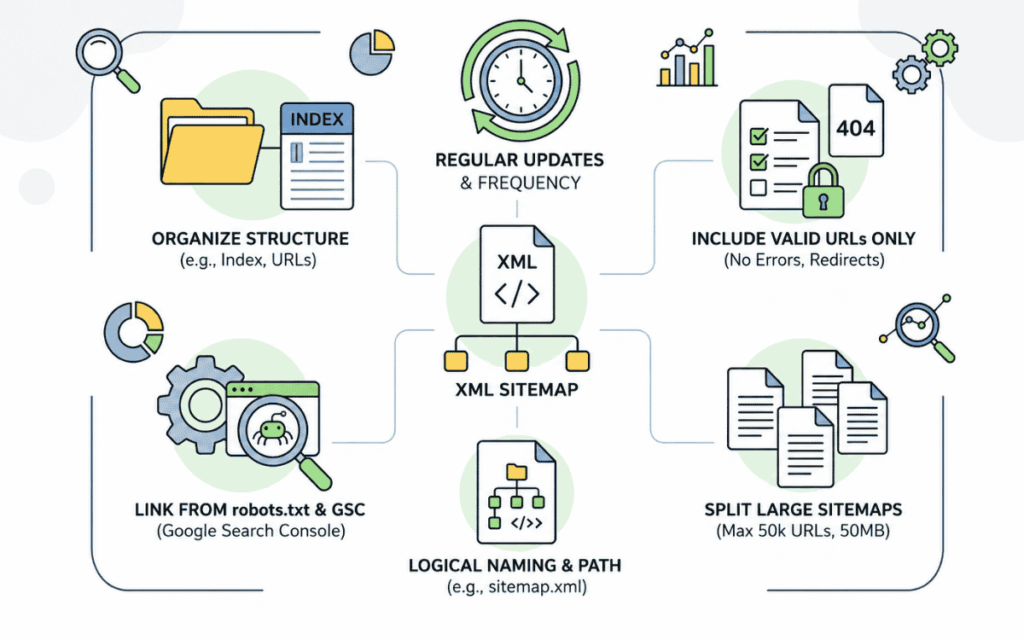
Include only indexable, canonical URLs. Your sitemap should list pages you actually want indexed. Exclude noindex pages, duplicate URLs, redirects, and low-value URLs like filtered category pages or internal search results.
Keep it updated automatically. Use a CMS plugin or platform feature that automatically updates your sitemap whenever you publish, update, or remove content. A stale sitemap misleads crawlers and wastes indexing resources.
Submit your sitemap to Google Search Console. Go to the Sitemaps section and submit your sitemap URL directly. This gives Google a direct channel to receive your sitemap and allows you to monitor indexing status and errors.
Use sitemap index files for large sites. Individual sitemaps have a limit of 50,000 URLs and 50MB uncompressed. For large sites, create a sitemap index file that references multiple individual sitemap files – one for blog posts, one for products, one for service pages, and so on.
Monitor sitemap errors regularly. Google Search Console reports errors when URLs in your sitemap cannot be crawled or indexed. Review these regularly and fix underlying issues promptly.
Match sitemap URLs to canonical URLs. If your pages use canonical tags, ensure the URLs in your sitemap exactly match the canonical versions. Discrepancies confuse crawlers and weaken indexing signals.
Prioritise high-value pages. Use the priority field strategically – assign a higher priority to your most commercially important pages. This guides search engines toward your key conversion pages first.
Common Sitemap Mistakes That Hurt SEO
Even well-intentioned sitemaps can create problems when configured incorrectly. Avoid these common errors:
- Including 404 pages – submitting broken URLs signals poor site health to search engines
- Including redirected URLs – list only final destination URLs, not pages that redirect elsewhere
- Bloating the sitemap with low-quality pages – thin content, duplicate pages, and parameter URLs dilute the value of your sitemap
- Forgetting to update after site migrations – when URLs change, sitemaps must be updated immediately to reflect new structures
Speaking of migrations – SEO for a site migration is one of the highest-risk scenarios in technical SEO, and sitemap accuracy is critical to preserving rankings when URL structures change.
Sitemaps and Local SEO
For businesses targeting local markets, sitemaps play a supporting role in local SEO strategy. Local landing pages – city-specific or region-specific service pages – must be indexed to rank in local search results.
A properly configured sitemap ensures all local landing pages are submitted for indexing, even if internal linking across those pages is thin. This is particularly relevant for businesses with many location-specific pages spread across a large site.
Creating content for local landing pages for SEO is only effective if those pages are indexed – and a comprehensive sitemap is what makes that indexing happen reliably.
Do You Always Need a Sitemap?
Google has stated that small, simple websites with good internal linking may not strictly need a sitemap. If every page on your site is reachable from the homepage within a few clicks, crawlers will likely find everything without one.
However, even for small sites, a sitemap adds negligible cost and meaningful insurance. There is no downside to having one – only potential upside.
For any site that fits the following criteria, a sitemap is essential:
- More than a few hundred pages
- Newly launched with limited inbound links
- Contains content updated frequently
- Uses JavaScript-heavy architecture that crawlers may struggle to process
- Has undergone a recent site migration or URL restructuring
- Contains important pages that are not well-linked internally
In short: if you’re serious about SEO, you should have a sitemap – regardless of site size. And if your site is large or complex, a sitemap is non-negotiable.
How SurgeAIO Can Help in Terms of SEO
SurgeAIO helps businesses build and maintain the technical SEO foundations that support strong, sustainable organic performance – including everything related to sitemap health and crawlability.
Here is how SurgeAIO supports your technical SEO:
Technical SEO Auditing – SurgeAIO automatically scans your website for technical issues that affect indexing, including sitemap errors, crawl anomalies, orphan pages, and broken URLs. Issues are flagged clearly with prioritised fix recommendations.
Crawlability Monitoring – The platform tracks how well search engines are discovering and indexing your pages over time. You can see which pages are indexed, which are excluded, and why – in one clear dashboard.
Content and URL Management – SurgeAIO helps you manage your URL structure intelligently, ensuring that your sitemap always reflects the most current, canonical version of your site – free of redirects, duplicates, and low-value URLs.
Site Migration Support – When URL structures change, SurgeAIO helps track the impact on indexing and rankings, alerting you to pages that drop out of crawl coverage so you can address them quickly.
AI Visibility and Indexing Intelligence – As AI search tools increasingly reference indexed web content to generate answers, SurgeAIO ensures your content is structured and technically accessible in ways that support both traditional crawling and AI-driven discovery.
Performance Reporting – Clear, actionable reports show how your technical SEO health – including sitemap performance – translates into organic traffic and ranking improvements over time.
Whether you’re managing a small business website or a large enterprise platform, SurgeAIO provides the technical visibility you need to ensure nothing important is left unindexed.
Final Thoughts
How important is a sitemap for SEO? It is foundational. Not in the way that great content or strong backlinks are – but in the way that a solid foundation supports everything built on top of it.
A sitemap ensures search engines can find your pages, index them efficiently, and prioritise the content that matters most to your business. It protects against orphan pages, crawl budget waste, and indexing gaps that silently undermine even the best content strategies.
Set it up correctly. Keep it updated. Monitor it regularly. And let it do the quiet but essential work of making sure every important page on your site gets the visibility it deserves.
Frequently Asked Questions
Q1. Does a sitemap directly improve my Google rankings?
No - a sitemap does not directly boost rankings. However, it improves crawling and indexing efficiency, which is a prerequisite for ranking. Without proper indexing, even excellent content cannot rank.
Q2. How do I submit a sitemap to Google?
Go to Google Search Console, navigate to the Sitemaps section, enter your sitemap URL (typically yoursite.com/sitemap.xml), and click Submit. Google will then begin processing your sitemap and report any errors.
Q3. How often should I update my sitemap?
Your sitemap should update automatically whenever you add, modify, or remove content. Most modern CMS platforms - including WordPress with Yoast or Rank Math - handle this automatically. If yours does not, update manually whenever significant content changes occur.
Q4. What is the difference between an XML and an HTML sitemap?
An XML sitemap is designed for search engine crawlers - it lists URLs and metadata in a machine-readable format. An HTML sitemap is a user-facing page listing your site's content in a human-readable format. Both serve different purposes, and ideally, both should exist on your site.
Q5. Can a sitemap hurt my SEO?
A poorly configured sitemap can create problems - for example, if it includes 404 pages, redirects, or noindex URLs. These signal poor site health to search engines. Always audit your sitemap regularly to ensure it only contains clean, indexable, canonical URLs.
Q6. Do I need a sitemap if my website has good internal linking?
For very small sites with strong internal linking, a sitemap is less critical - but still recommended. For any site with more than a few dozen pages, complex architecture, or frequent content updates, a sitemap is essential for reliable indexing.
Q7. What happens if I don't have a sitemap?
Without a sitemap, search engines must discover your pages entirely through link-following. This means new pages may take longer to index, orphan pages may never be found, and crawl budget may be wasted on low-priority URLs rather than your most important content.
