
YouTube is the world’s second-largest search engine. Every day, billions of searches happen on the platform – and most creators never tap into that potential because they skip one critical step: keyword research.
If you want your videos to get discovered, you need to understand how to find YouTube keyword competition score and SEO data. This means identifying search terms your target audience uses, evaluating how hard those terms are to rank for, and optimising your content so YouTube’s algorithm finds and surfaces it.
This guide walks you through the entire process – from identifying seed keywords to using the right tools to optimise your video metadata for maximum organic reach.
Why YouTube Keyword Research and SEO Matter
YouTube SEO works differently from Google SEO, but the core principle is the same. YouTube’s algorithm matches viewer search queries with video content based on several signals – including titles, descriptions, tags, transcripts, and engagement metrics.
Creators who understand keyword competition scores and search volume data consistently outperform those who upload content without research. They rank faster, grow their subscriber base more predictably, and build channels that compound traffic over time.
Moreover, YouTube videos also appear in Google search results. Optimising for YouTube keywords creates a dual-search presence – your content can rank on both platforms simultaneously.
Understanding how important keywords are for SEO applies directly to YouTube. The same principles of search intent, keyword relevance, and content quality drive discoverability on both platforms.
What Is a YouTube Keyword Competition Score?
A YouTube keyword competition score is a metric that measures how difficult it is to rank for a specific search term on YouTube. It reflects the number and quality of videos already targeting that keyword.
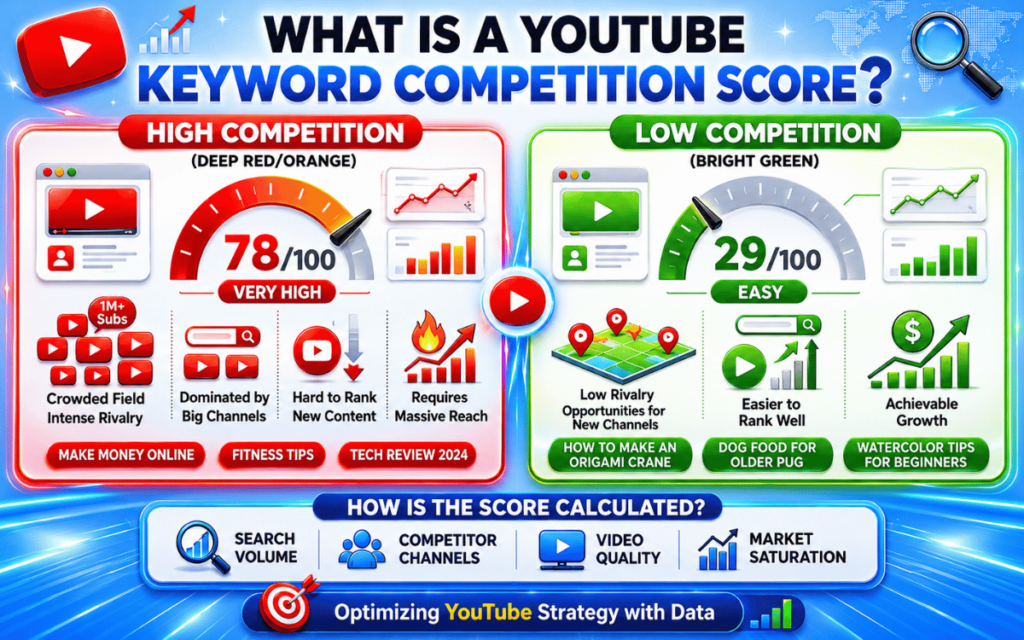
Most YouTube SEO tools express competition on a scale from 0 to 100:
- 0-30 (Low competition): Easier to rank. Ideal for new and growing channels.
- 31-60 (Medium competition): Achievable with good optimisation and some channel authority.
- 61-100 (High competition): Dominated by established channels with large subscriber bases and strong engagement metrics. Very difficult to break into without significant authority.
The goal is to find keywords with enough search volume to drive meaningful traffic, but low enough competition that your video can realistically rank on the first page of results. This balance is often called the “keyword opportunity sweet spot.”
Step 1 – Start with Seed Keywords
Every YouTube keyword research session begins with seed keywords. These are broad, foundational terms that describe your video’s core topic.
For example:
- If your channel is about personal finance, seed keywords might include “budgeting,” “investing for beginners,” or “saving money.”
- If your channel covers tech reviews, seeds might include “laptop review,” “best headphones,” or “smartphone comparison.”
You will not rank for broad seed keywords right away. Their purpose is to generate more specific, rankable keyword ideas through the research process.
How to generate seed keywords:
- Think about the main topics your target audience searches for
- Write down the problems your videos solve
- Look at what your most successful competitors create content about
- Use the YouTube search bar – type a word and note the autocomplete suggestions
YouTube autocomplete shows real search queries ranked by frequency. These suggestions are a goldmine for discovering what your audience actually types into the search bar.
Step 2 – Find YouTube Keyword Competition Scores with the Right Tools
Once you have seed keywords, you need tools that provide competition scores, search volume estimates, and related keyword data. Here are the most effective options:
TubeBuddy Keyword Explorer
TubeBuddy is a browser extension that integrates directly into YouTube’s interface. Its Keyword Explorer tool provides:
- A keyword score that combines search volume and competition into a single metric
- A “Competition” rating showing how many videos already target the term
- A “Search Volume” estimate showing monthly query frequency
- Related keyword suggestions with their individual scores
- A “Weighted Score” that factors in your specific channel’s ability to rank
TubeBuddy’s weighted score is particularly useful. It adjusts the overall keyword difficulty based on your channel size and authority – so a term that is too competitive for a new channel may show as achievable for a more established one.
VidIQ Keyword Tools
VidIQ offers two keyword research tools that work differently but complement each other:
VidIQ Keyword Generator
Enter any topic and receive a list of related keywords with search volume data, competition scores, and trend direction. It is the fastest way to explore a new topic area and identify quick-win opportunities.
VidIQ Keyword Inspector (Browser Extension)
This tool appears directly within YouTube while you browse. It shows real-time keyword data – including search volume, competition score, and related queries – without leaving the platform.
VidIQ also surfaces rising keywords – terms currently gaining search momentum that have not yet become highly competitive. Acting on these early gives your channel a significant ranking advantage.
Keyword Tool Dominator
Keyword Tool Dominator generates large volumes of YouTube-specific keyword ideas by pulling directly from YouTube’s autocomplete database. It surfaces the exact phrases real users are searching, organised by frequency.
This tool is particularly valuable for:
- Discovering long-tail keyword variations you would not think of manually
- Finding keywords specific to different countries and languages
- Building comprehensive keyword lists before filtering by competition and volume
OutlierKit
OutlierKit combines YouTube keyword research with competitor analysis. It provides opportunity scores that factor in both search demand and the competitive landscape, helping creators identify which keywords give them the highest probability of ranking.
A particularly useful feature is the “outlier video” analysis – it identifies which competitor videos significantly overperformed their channel average, revealing the exact keywords and topic angles that drove outsized results.
For established channels, OutlierKit recommends targeting keywords with search volumes above 1,000 per month and difficulty scores below 60. For newer channels, targeting 300–5,000 monthly searches with difficulty below 40 is a more realistic and sustainable approach.
Building a strong keyword gap strategy for YouTube works similarly to how it does in traditional SEO – identify what competitors rank for that you currently do not target, and fill those gaps with well-optimised video content.
Step 3 – Evaluate Search Intent Before Targeting Any Keyword
Search volume and competition scores are important – but they are meaningless without understanding search intent. Search intent is the reason behind a user’s query.
On YouTube, there are four main intent types:
- Informational: “How does X work?” – viewers want to learn something
- Tutorial/How-to: “How to do X step by step” – viewers want guided instruction
- Review/Comparison: “X vs Y” or “Best X for Y” – viewers are evaluating options before buying
- Entertainment: Content searched for enjoyment, not information
Match your keyword selection to the type of video you create. A review channel targeting “how-to” tutorial keywords will struggle because the content format does not match what viewers expect. Conversely, educational channels targeting review keywords compete with content better suited to the searcher’s actual needs.
Always watch the top 5 search results for any keyword before targeting it. If the existing videos do not match your planned content format, the keyword’s search intent likely does not align with what you want to create.
Step 4 – Identify Low-Competition Keywords Systematically
The fastest-growing YouTube channels focus on low-competition keywords that established channels overlook. Here is a proven method for finding them:
The Search-vs-Results Method:
- Type your keyword into the YouTube search
- Check the total number of video results shown
- Keywords with high monthly searches but fewer than 10,000 results are underserved
- Cross-reference with a tool like VidIQ or TubeBuddy to confirm the competition score is below 40
Long-tail keyword targeting:
Long-tail keywords are three-to five-word phrases that are more specific than broad terms. They have lower search volume but also much lower competition – making them significantly easier to rank for.
Examples of long-tail YouTube keyword opportunities:
- Instead of “investing” → “how to invest $500 for beginners”
- Instead of “home workout” → “20-minute home workout no equipment apartment”
- Instead of “video editing” → “how to edit YouTube videos on iPhone for free”
These specific phrases attract viewers with clearer intent, which also tends to produce higher watch time and better engagement – two signals that further boost rankings.
Understanding the lowest competition searches gives you a framework that applies directly to YouTube keyword targeting. The same logic of finding gaps where demand exceeds supply drives discoverability on both Google and YouTube.
Step 5 – Optimise Your Video with the Target Keyword
Finding the right keyword is only half the battle. You also need to place it strategically within your video to signal relevance to YouTube’s algorithm.

Where to place your target keyword:
- Video title: Include the keyword within the first five words if possible. YouTube weighs the beginning of titles more heavily.
- Video description: Use the keyword naturally within the first two sentences. Write a full, informative description of at least 150 words – this gives YouTube more context for ranking.
- Tags: Include your primary keyword as the first tag, followed by close variations and related terms. Tags reinforce the topic signals already in your title and description.
- Spoken in the video: YouTube auto-generates transcripts from your audio. When you naturally speak your target keyword in the video, it appears in the transcript, which YouTube uses as a ranking signal.
- File name: Before uploading, rename your video file to include the keyword (e.g., “how-to-invest-500-beginners.mp4”). This is a minor but worthwhile optimisation.
- Thumbnail alt text: On YouTube Studio, optimise your thumbnail’s title and description with the keyword where possible.
This multi-placement approach ensures that YouTube’s algorithm encounters your target keyword across every possible metadata touchpoint – improving your video’s topical relevance score.
Step 6 – Track Rankings and Refine Your Strategy
YouTube SEO is not a one-and-done process. You need to monitor performance and continually refine your keyword strategy based on real data.
Key YouTube metrics to track:
- Search impressions: How many times your video appeared in YouTube search results for your target keyword
- Click-through rate (CTR): The percentage of impressions that resulted in a click – a low CTR suggests your title or thumbnail needs improvement
- Average view duration: Higher watch time signals to YouTube that your content satisfies viewer intent – which boosts rankings
- Traffic source breakdown: YouTube Analytics shows exactly how much of your traffic comes from search vs. suggested vs. external sources
Use this data to identify which keywords drive the most search traffic and which videos underperform. Prioritise updating underperforming videos’ titles, descriptions, and tags before creating new content.
Reviewing content performance data regularly is just as important for YouTube SEO as it is for website SEO. Optimising existing content often delivers faster results than creating new videos from scratch.
YouTube Keyword Competition Score – Quick Reference Table
| Competition Score | Difficulty Level | Best For |
| 0-30 | Low | New channels (under 1K subscribers) |
| 31-50 | Medium-Low | Growing channels (1K–10K subscribers) |
| 51-70 | Medium-High | Established channels (10K–100K subscribers) |
| 71-100 | High | Large channels (100K+ subscribers) |
How SurgeAIO Can Help in Terms of SEO
YouTube SEO does not exist in isolation. The most successful creators integrate their video strategy with a broader SEO and content marketing approach – and that is where SurgeAIO adds significant value.
SurgeAIO helps businesses and content creators connect their YouTube keyword strategy with their overall organic search presence. A video that ranks on YouTube can also appear in Google search results – doubling your content’s discoverability potential.
Here is how SurgeAIO supports a cross-platform SEO strategy:
- Keyword intelligence: Identify high-value search terms that work across both YouTube and Google search – so your content investments serve multiple platforms simultaneously.
- Competitive gap analysis: Discover what topics competitors dominate and which gaps you can fill with targeted video content.
- Content performance tracking: Monitor how your YouTube videos contribute to broader organic traffic and brand visibility goals.
- AI-powered optimisation insights: Get data-driven recommendations for titles, descriptions, and topic angles that maximise discoverability.
- Cross-channel reporting: See how your YouTube presence impacts your website’s SEO metrics and overall digital footprint.
If you are serious about growing through search – on both YouTube and Google – understanding what SEO and GEO are and how they work together is essential context. SurgeAIO gives you the tools to execute that integrated strategy confidently.
Common Mistakes to Avoid in YouTube Keyword SEO
Even experienced creators repeat these costly errors:
- Targeting keywords that are too competitive too early: New channels should always start with low-competition, long-tail keywords before moving to broader terms.
- Ignoring search intent: Targeting a keyword without watching the top-ranking videos first often leads to content that does not match what viewers actually want.
- Keyword stuffing in titles: Over-optimised titles that cram in multiple keywords look spammy and hurt click-through rates.
- Neglecting the video description: Many creators write one or two sentences in the description – missing a major opportunity to signal relevance to YouTube’s algorithm.
- Not speaking the keyword naturally in the video: Forgetting that YouTube transcribes audio means missing one of the most powerful ranking signals available.
- Never updating old videos: Refreshing titles, descriptions, and tags on existing videos can recover lost rankings without producing any new content.
Final Thoughts
Learning how to find YouTube keyword competition score and SEO data is the skill that separates channels that grow from channels that stagnate. The process is straightforward when you follow a structured approach – start with seed keywords, use research tools to evaluate competition and search volume, match content to search intent, optimise all metadata strategically, and track results consistently.
Moreover, YouTube SEO and traditional website SEO are more connected than most creators realise. Building a presence on both platforms amplifies your overall organic visibility and creates multiple pathways for your target audience to discover your content.
Start with one well-researched keyword, create the best possible video for that topic, and use the data to refine your strategy with every upload. That is how sustainable YouTube growth actually works.
Frequently Asked Questions
Q1: What is a good keyword competition score for YouTube?
For new channels, a competition score below 30 is ideal. Growing channels with some authority can target scores up to 50. Established channels with large audiences can compete for scores up to 70. Scores above 70 are generally dominated by channels with hundreds of thousands of subscribers.
Q2: Does YouTube have an official keyword competition score?
No. YouTube does not publicly publish keyword competition data or search volume figures. All competition scores and volume estimates come from third-party tools like TubeBuddy, VidIQ, and OutlierKit, which use their own methodologies and data sources. Treat these as directional estimates rather than exact figures.
Q3: How many tags should I use on a YouTube video?
YouTube allows up to 500 characters worth of tags. Use 8–15 well-chosen tags that include your primary keyword, close variations, and related topic terms. Quality and relevance matter far more than quantity. Irrelevant tags can actually confuse YouTube’s algorithm about what your video covers.
Q4: Can YouTube SEO help my videos rank on Google too?
Yes. YouTube videos frequently appear in Google search results, particularly for how-to, tutorial, and review queries. Optimising your videos for relevant keywords increases the chance they rank on both platforms – effectively doubling the organic reach of every piece of content you create.
Q5: How long does it take for YouTube SEO to work?
Results vary significantly. Some well-optimised videos targeting low-competition keywords can rank within days of uploading. For more competitive keywords, it may take weeks or months as YouTube assesses engagement signals. Consistency is crucial – channels that publish regularly and apply keyword research to every video see compounding growth over time.
Q6: Is it better to target trending or evergreen keywords on YouTube?
Both have value. Evergreen keywords drive consistent, long-term search traffic. Trending keywords can deliver a large volume of views quickly but often spike and fade. A balanced strategy targets approximately 70% evergreen and 20% trending keywords, with the remaining 10% focused on brand or competitor comparisons. This mix builds sustainable channel growth.
Q7: Do YouTube keyword tags still matter in 2026?
Tags carry less weight than they did in earlier years, but they still contribute to ranking signals – particularly when other metadata signals are consistent. Your title and description are now the most important keyword placement locations. However, well-chosen tags remain a useful reinforcement tool and should not be ignored.
