WordPress powers over 43% of all websites on the internet. However, having a WordPress site doesn’t automatically mean people will find it. You need to actively work on how to improve SEO on WordPress to drive consistent, organic traffic.
This guide covers every key step – from technical setup to content strategy – so you can rank higher and attract the right audience.
Why WordPress SEO Matters More Than Ever
Search engines handle billions of queries every day. Users click the first or second result most of the time. If your WordPress site isn’t optimized, you’re simply invisible to potential visitors.
Moreover, SEO is not just advertising. It’s a long-term investment that builds compounding traffic over time. The sooner you start, the sooner results follow.
Step 1: Check Your WordPress Visibility Settings
Before anything else, make sure your site is actually visible to search engines.
WordPress includes a built-in setting called “Discourage search engines from indexing this site.” It’s useful during development. However, if it stays on after launch, Google will never crawl your pages.
How to fix it:
- Go to Settings → Reading in your WordPress dashboard
- Make sure the “Search engine visibility” checkbox is unchecked
- Save your changes
This single check can unlock all your future SEO efforts. Don’t skip it.
Step 2: Install an SEO Plugin
WordPress doesn’t come with built-in SEO controls. Therefore, you need a dedicated plugin to manage titles, meta descriptions, sitemaps, and more.
The most trusted options include:
- Yoast SEO – popular, beginner-friendly, with a real-time content analysis tool
- Rank Math – powerful free plan, detailed insights, and schema markup support
- All in One SEO (AIOSEO) – feature-rich and widely used by professionals
Pick one and configure it properly from the start. These plugins guide you through on-page optimization every time you publish a post.
Step 3: Set Up SEO-Friendly Permalinks
Your URL structure directly impacts how search engines understand your content. WordPress defaults to a messy URL like /?p=123. That tells search engines nothing meaningful.
How to fix it:
- Go to Settings → Permalinks
- Select “Post name” as your permalink structure
- Save changes
This makes your URLs clean and descriptive – for example, yoursite.com/how-to-improve-seo-on-wordpress. Clear URLs help both users and search engines understand what your page is about.
Step 4: Do Proper Keyword Research
You can’t improve your rankings without targeting the right keywords that are important for SEO. Keyword research tells you what your audience is searching for and how competitive those terms are.
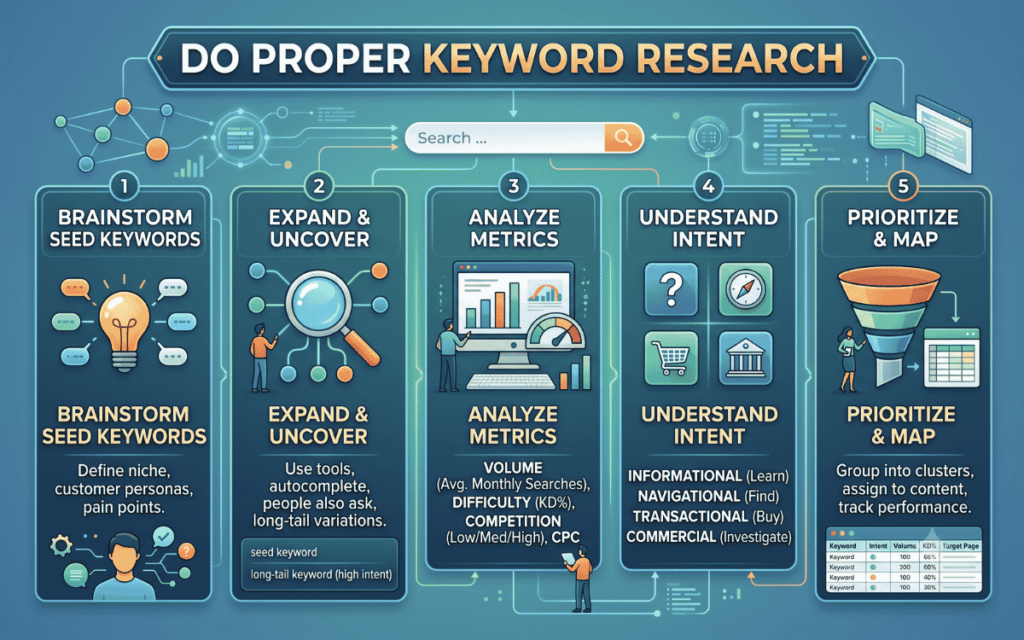
Key steps for keyword research:
- Use tools like Google Keyword Planner, Ahrefs, or SEMrush
- Focus on long-tail keywords – they have lower competition and higher intent
- Identify the primary keyword for each page and build content around it
- Avoid targeting multiple unrelated keywords on one page
Understanding search intent is equally important. A user searching “how to improve SEO on WordPress” wants a tutorial – not a product page. Match your content format to what the user actually needs.
Step 5: Optimize Your On-Page SEO Elements
On-page SEO covers everything within your pages that signals relevance to search engines. These elements deserve your close attention on every post or page you publish.
Title Tag
Your title tag is the most important on-page element. It tells both search engines and users exactly what your page covers.
- Include your primary keyword near the beginning
- Keep it under 60 characters to avoid truncation in search results
- Make it compelling – users need a reason to click
Meta Description
Meta descriptions don’t directly affect rankings. However, they influence click-through rates significantly.
- Keep them under 160 characters
- Include your keyword naturally
- End with a clear call to action
Headings (H1, H2, H3)
Use a single H1 tag on each page – that’s your main title. Use H2s for major sections and H3s for subsections. This hierarchy helps search engines understand your content structure.
Image Alt Text
Search engines can’t see images. Alt text describes images in text form, helping with both SEO and accessibility. Always fill in the alt text with descriptive, keyword-relevant language.
Step 6: Create High-Quality, Structured Content
Content is still the foundation of WordPress SEO. However, not just any content – it needs to be useful, well-organized, and aligned with what users are searching for.
A strong content strategy involves knowing how many words a blog post should be for SEO and structuring it with clear headings, short paragraphs, and logical flow.
Best practices for SEO content:
- Answer the user’s question early in the article
- Use short sentences – 20 to 25 words maximum
- Break up text with bullet points, numbered lists, and subheadings
- Add original insights, examples, or data where possible
- Update old content regularly to keep it fresh and accurate
In addition, keep keyword density between 1% and 1.5%. Overusing your keyword makes content feel unnatural and can trigger penalties.
Step 7: Build a Strong Internal Linking Structure
Internal links connect your pages. They help search engines discover more of your content and understand how your pages relate to one another.
Moreover, internal links pass link equity from stronger pages to newer or weaker ones. This helps distribute ranking power across your entire site.
Internal linking tips:
- Link to relevant posts using descriptive, keyword-rich anchor text
- Don’t use generic anchors like “click here”
- Aim for 3 to 5 internal links per post
- Regularly audit your site for orphan pages – pages with no internal links pointing to them
For example, if you run a local business site, understanding how local SEO attracts local customers is essential context for building a targeted internal linking structure.
Step 8: Generate and Submit an XML Sitemap
An XML sitemap lists all the important pages on your website. It helps search engines crawl and index your content more efficiently.
Most SEO plugins like Yoast or Rank Math generate a sitemap automatically. Once created:
- Go to Google Search Console
- Navigate to Sitemaps
- Submit your sitemap URL (usually yoursite.com/sitemap.xml)
This step is especially critical when you consider how important a sitemap is for SEO – it ensures no valuable content is left uncrawled.
Step 9: Improve Site Speed
Page speed is a confirmed Google ranking factor. Slow sites frustrate users and get pushed down in search results. Therefore, optimizing load time is a direct SEO action.
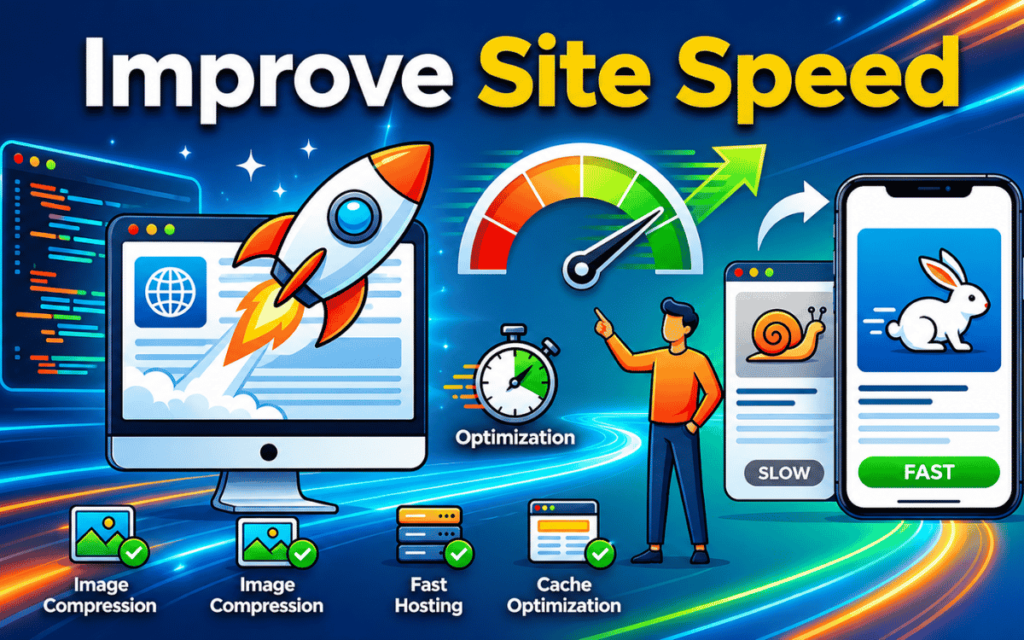
How to speed up your WordPress site:
- Use a fast, lightweight theme
- Install a caching plugin such as WP Rocket or W3 Total Cache
- Compress and resize images before uploading
- Use a Content Delivery Network (CDN) to serve files faster globally
- Minimize the number of plugins you install
Test your site regularly with Google PageSpeed Insights or GTmetrix. Aim for a load time under 3 seconds on both desktop and mobile.
Step 10: Make Your Site Mobile-Friendly
More than half of all web traffic comes from mobile devices. Google uses mobile-first indexing, meaning it evaluates the mobile version of your site first when determining rankings.
Mobile SEO checklist:
- Use a responsive WordPress theme
- Test your site using Google’s Mobile-Friendly Test tool
- Avoid pop-ups that block mobile content
- Ensure buttons and links are easy to tap on small screens
- Keep font sizes readable without zooming
A poor mobile experience directly hurts your rankings. Don’t treat it as optional.
Step 11: Earn Quality Backlinks
Backlinks – links from other websites pointing to yours – are one of the strongest ranking signals. They indicate authority and trust to search engines.
However, quality matters far more than quantity. Working with backlink companies for SEO or following a strategic outreach plan can accelerate your link-building efforts significantly.
Effective backlink strategies:
- Create genuinely useful, shareable content such as guides, original research, or infographics
- Reach out to relevant sites for guest posting opportunities
- Fix broken links on other websites by offering your content as a replacement
- List your site on legitimate industry directories
Avoid buying links or participating in link schemes. These tactics violate Google’s guidelines and can result in serious penalties.
Step 12: Use Schema Markup
Schema markup is structured data added to your website’s HTML. It helps search engines better understand your content and can earn you rich snippets in search results – such as star ratings, FAQs, or breadcrumbs.
These enhanced listings stand out on the results page and can significantly improve click-through rates.
Common schema types for WordPress sites:
- Article schema for blog posts
- FAQ schema for question-and-answer sections
- LocalBusiness schema for local businesses
- Product schema for eCommerce pages
- Review the schema for testimonials or product reviews
Most SEO plugins make adding schema straightforward – no coding needed.
Step 13: Monitor Performance and Track SEO Progress
SEO is not a one-time task. You need to track your performance and adjust your strategy based on real data. This is where content performance data becomes essential – it shows what’s working, what isn’t, and where your biggest opportunities lie.
Key tools to use:
- Google Search Console – track impressions, clicks, ranking positions, and crawl errors
- Google Analytics – understand user behavior, traffic sources, and bounce rates
- Your SEO plugin – monitor on-page scores and optimization suggestions
Set aside time each month to review your data. Identify which pages are performing well and which need improvement. Double down on what’s working.
How SurgeAIO Can Help in Terms of SEO
Improving SEO on WordPress is much easier with the right tools behind you. SurgeAIO is a comprehensive platform designed to give WordPress site owners a competitive edge in both traditional SEO and AI-driven search.
Here’s what SurgeAIO brings to the table:
- Keyword tracking and research – find the right keywords for every page and monitor rankings over time
- Content optimization insights – get actionable suggestions to improve on-page SEO before and after publishing
- AI visibility monitoring – track how your content appears in AI-generated results from tools like ChatGPT and Google AI Overviews
- Competitor analysis – see exactly where competitors rank and identify gaps you can capitalize on
- Performance reporting – clean dashboards that show SEO progress without needing to interpret raw data
Whether you’re managing a blog, a business site, or an eCommerce store, SurgeAIO streamlines the entire SEO workflow and helps you see results faster.
Final Thoughts
Learning how to improve SEO on WordPress doesn’t have to be overwhelming. Start with the fundamentals – visibility settings, permalinks, an SEO plugin, and solid keyword research. Then build on that foundation with quality content, internal linking, and backlinks.
Ultimately, SEO is a continuous process. The sites that rank consistently are the ones that invest in it consistently. Take it one step at a time, track your progress, and adjust your strategy as you learn what works.
Frequently Asked Questions
Q1. Is WordPress good for SEO?
Yes. WordPress is one of the most SEO-friendly CMS platforms available. It supports clean URLs, fast themes, SEO plugins, and structured data – all essential for ranking well in search results.
Q2. Which is the best SEO plugin for WordPress?
The most popular options are Yoast SEO, Rank Math, and All in One SEO. All three offer solid free plans. Rank Math is widely considered the most feature-rich free option currently available.
Q3. How long does SEO take to show results on WordPress?
SEO is a long-term strategy. Most sites begin to see meaningful results within 3 to 6 months, depending on competition, content quality, and how consistently you apply best practices.
Q4. How many keywords should I target per page?
Focus on one primary keyword per page, supported by 2 to 3 closely related secondary keywords. Targeting too many unrelated keywords confuses search engines and dilutes your content’s focus.
Q5. Do I need backlinks to rank on WordPress?
Yes, backlinks remain one of the most important ranking factors. However, quality matters more than quantity. Focus on earning links from relevant, authoritative sites rather than pursuing volume alone.
Q6. Is WordPress or Squarespace better for SEO?
WordPress offers more control and flexibility than Squarespace. If you’re serious about organic growth, WordPress is generally the better choice for SEO thanks to its plugin ecosystem and deep customization options.
Q7. How often should I update WordPress content for SEO?
Review your key pages every 6 to 12 months. Update statistics, refresh examples, and improve sections based on search performance data. Fresh, accurate content tends to rank better over time.
