Every element of your website sends signals to search engines. Your URL is one of the first signals Google reads – before it even opens the page. A clean, well-structured URL tells both users and crawlers exactly what a page is about. However, most website owners ignore this and leave messy, confusing URLs that quietly hurt their rankings.
In this guide, you will learn how to optimize your website’s URL structure for SEO, step by step.
Why URL Structure Matters for SEO
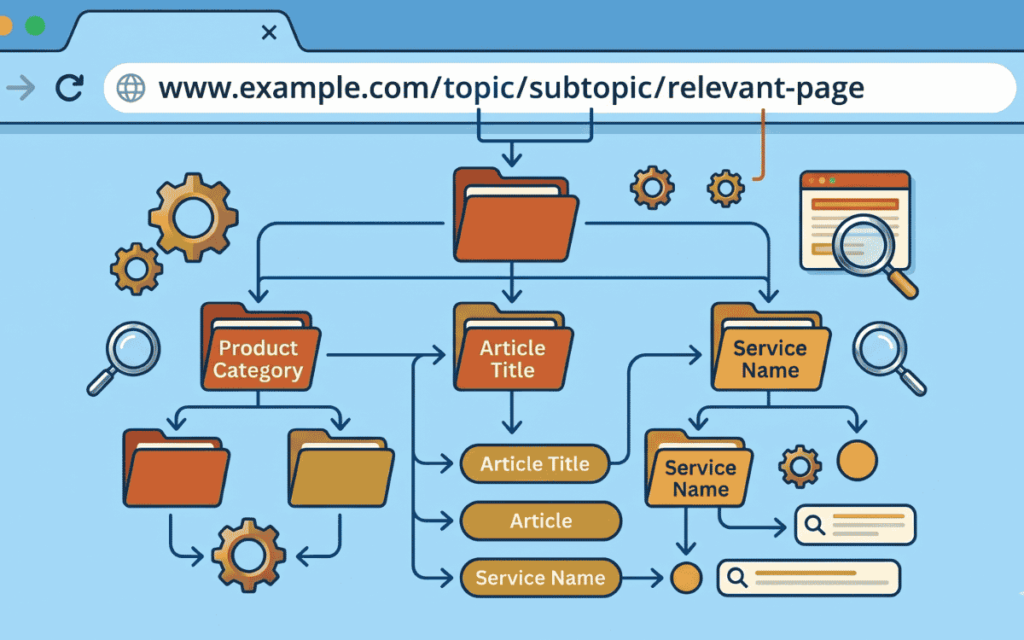
A URL is the unique web address of any page on the internet. It consists of a protocol (HTTPS), a domain name, and a file path. Together, these components create a roadmap for search engines.
Search engines like Google use URLs to understand page hierarchy, content relevance, and site structure. Moreover, clean URLs improve user experience – a visitor can read the URL and immediately know what the page contains.
Poor URL structures, on the other hand, create problems. They confuse crawlers, split link authority, and reduce click-through rates in search results. In fact, URLs that closely match a search query earn significantly higher CTR than those that don’t.
Understanding how keywords are important for SEO starts with something as fundamental as the URL itself.
The Core Elements of an SEO-Friendly URL
Before diving into best practices, understand what makes a good URL structure:
- Protocol: Always use HTTPS. It is a confirmed Google ranking signal and builds user trust.
- Domain: Keep it short, brandable, and free of extra characters.
- Slug: The specific identifier for your page, written in descriptive, keyword-rich words.
- Subdirectories: Logical folders that organize content by category or topic.
Best Practices to Optimize Your Website’s URL Structure for SEO
1. Use Short, Descriptive Slugs
Long URLs confuse users and dilute keyword focus. Keep your slug to three to five meaningful words. Shorter URLs are easier to remember, easier to share, and perform better in search results.
- Good: /seo-url-structure
- Bad: /the-complete-beginners-guide-to-understanding-seo-url-structure-in-2025
Additionally, keep the entire URL under 60 to 70 characters wherever possible. This ensures it displays cleanly in search result snippets without getting truncated.
2. Include the Primary Keyword in the URL
Your URL slug should contain your primary keyword naturally. This sends a strong relevance signal to Google and can bold the keyword in search snippets, increasing click-through rates.
However, avoid keyword stuffing. Including the keyword once is sufficient. Repeating it looks spammy and does not improve rankings.
If you are working on how many SEO keywords per page is optimal, apply the same discipline to your URL – one focused term per page.
3. Use Hyphens, Not Underscores
Always separate words in a URL with hyphens (-), not underscores (_). Google treats hyphens as word separators. It does not treat underscores the same way, which means seo_url_structure could be read as one single word.
- Correct: /seo-url-structure
- Incorrect: /seo_url_structure
This is a small change that has a clear, documented impact on how search engines interpret your URL.
4. Use Lowercase Letters Only
URLs are case-sensitive on many servers. /About-Us and /about-us can be treated as two separate pages, which creates duplicate content problems and splits your ranking authority.
Always use lowercase letters throughout your URL structure. This is a simple rule that prevents significant technical SEO issues down the line.
5. Keep a Shallow Folder Structure
Limit subdirectories to one or two levels whenever possible. Deep URL hierarchies – like /category/subcategory/sub-subcategory/page/ – push pages further from the root domain. Search engines may treat deeply nested pages as lower priority.
A shallow structure like /blog/seo-url-structure is better than /resources/guides/seo/url/structure/2025/.
This also ties into overall best SEO practices for site architecture – the flatter your structure, the more link equity flows to individual pages.
6. Avoid Dynamic Parameters When Possible
Dynamic URLs with parameters like ?id=123&session=abc are harder for search engines to crawl and index reliably. They also create duplicate content risks, since multiple parameter combinations can generate the same content under different URLs.
Use static, descriptive URLs wherever your CMS allows. If you must use parameters – for example, in e-commerce product filters – use canonical tags to point to the primary version of the page.
7. Remove Stop Words
Words like “the,” “and,” “of,” and “a” add length without adding meaning to a URL. Remove them to keep the slug concise and focused.
- Concise: /seo-url-guide
- Padded: /the-complete-guide-to-seo-url-structure
This keeps your URL clean, readable, and tightly aligned with the primary keyword.
8. Avoid Dates in URLs
Adding a year or date to a URL – like /seo-tips-2021/ – makes your content appear outdated, even if you update it. It also creates redirect headaches if you ever need to refresh the page.
Use evergreen slugs that don’t require a date. If your CMS inserts dates by default, update your permalink settings to remove them.
9. Always Use HTTPS
Google has confirmed HTTPS as a ranking factor. Beyond rankings, HTTPS builds trust with visitors. Without it, modern browsers display “Not Secure” warnings that deter users before they even read your content.
Ensure your SSL certificate is valid and that all HTTP URLs redirect properly to their HTTPS versions. This is one of the most foundational elements of what makes SEO work.
10. Ensure Every Directory Is Accessible
Every folder in your URL path should be a real, accessible page. If your blog post lives at /blog/seo-url-structure, then /blog/ should also load – ideally showing a list of all blog posts.
Broken directory paths create poor user experiences and waste crawl budget. They also make it harder for search engines to understand your site’s content hierarchy.
Common URL Mistakes That Hurt SEO
Many websites unknowingly make URL errors that reduce their organic performance. Here are the most common ones to avoid:
- Using session IDs in URLs – Use cookies instead to maintain cleaner, indexable URLs.
- Special characters and symbols – Characters like !, @, #, and % create compatibility issues and confuse crawlers.
- No 301 redirects after URL changes – Always redirect old URLs to new ones. Without this, you lose all the authority built on the original page.
- Inconsistent URL conventions – Mixing uppercase and lowercase, or using both hyphens and underscores, creates duplicate content and confuses crawlers.
- Overly deep folder structures – More than two or three levels of subdirectories reduce crawl efficiency and dilute page authority.
These mistakes are especially damaging if you are managing a site migration. Understanding SEO for a site migration includes a thorough URL audit and redirect strategy as a core component.
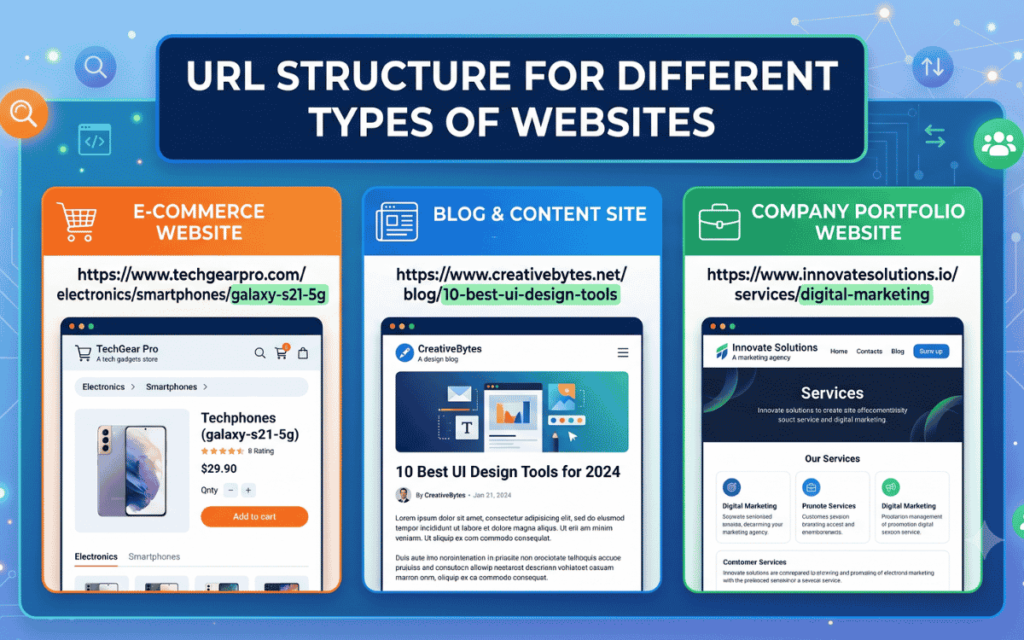
URL Structure for Different Types of Websites
Blogs and Content Sites
Keep blog URLs under the /blog/ subdirectory. Use the post’s primary keyword as the slug. Avoid category nesting beyond one level.
Example: https://example.com/blog/seo-url-structure
E-Commerce Sites
Use a product category structure. Keep product slugs descriptive. Avoid embedding session IDs or excessive filter parameters in indexable URLs.
Example: https://example.com/products/running-shoes
Service and Local Business Sites
Use location-based slugs for local SEO. Keep service pages at the root level or one folder deep.
Example: https://example.com/plumbing-services/new-york
For businesses targeting local audiences, a clean URL structure combines powerfully with how local SEO helps attract local customers through location-specific landing pages and structured content.
Multi-Language and Multi-Region Sites
Use language or country codes as subdirectories for multilingual sites. This helps Google serve the correct version to users in each region.
Example: https://example.com/de/seo-tipps
URL Optimization Checklist
Use this quick checklist before publishing or auditing any page:
- [ ] URL includes the primary keyword
- [ ] Slug uses hyphens to separate words
- [ ] All letters are lowercase
- [ ] No dates, session IDs, or stop words
- [ ] URL is under 60–70 characters
- [ ] Dynamic parameters are removed or minimized
- [ ] HTTPS is active, and SSL is valid
- [ ] No more than two subdirectory levels
- [ ] Every directory path is accessible
- [ ] 301 redirects are in place for any changed URLs
- [ ] Canonical tags are set for duplicate or parameterized pages
How SurgeAIO Can Help in Terms of SEO
Optimizing your URL structure is just one piece of the SEO puzzle. However, doing it manually across hundreds of pages is time-consuming and error-prone. This is where SurgeAIO provides a clear advantage.
SurgeAIO is an all-in-one SEO and AI visibility platform that helps you audit, optimize, and monitor your website’s performance. Here is how it supports URL optimization and broader SEO success:
Technical SEO Audits – SurgeAIO scans your entire website and flags technical issues, including broken URLs, redirect chains, session ID problems, duplicate content caused by poor URL parameters, and missing canonical tags. You get a clear, actionable list of what to fix.
Content Optimization – Once your URL structure is correct, SurgeAIO helps you align your page content with search intent. It analyzes keyword usage, content length, and on-page SEO signals to ensure every page performs at its best.
AI Visibility and GEO – As search increasingly shifts toward AI Overviews and generative engines, SurgeAIO helps you optimize for AI visibility techniques that go beyond traditional SEO. Clean URL structures are foundational for AI engines to crawl and reference your content.
Keyword and Competitor Research – SurgeAIO’s keyword tools help you identify the right terms to include in your URLs, so each page targets a search query with real volume and intent. This prevents keyword cannibalization across your site.
Tracking and Reporting – After optimization, SurgeAIO monitors your organic traffic, rankings, and content performance so you can see the direct impact of your URL improvements over time.
Whether you run a blog, an e-commerce store, or a B2B service website, SurgeAIO gives you the tools to build a URL structure that works – and keeps working as your site scales.
Final Thoughts
Your URL structure is a silent SEO signal that works every time a user searches, a crawler indexes, or an AI engine references your content. Optimizing it does not require advanced technical skills – but it does require consistency and attention to detail.
Start by auditing your existing URLs for the common mistakes covered in this guide. Then, apply the best practices going forward: short slugs, primary keywords, HTTPS, shallow folder structures, and lowercase letters throughout.
Therefore, make URL optimization a standard part of your SEO workflow. The improvements compound over time – cleaner URLs mean better crawlability, higher CTR, and stronger organic performance across every page of your site.
Frequently Asked Questions
Q1. What is an SEO-friendly URL?
An SEO-friendly URL is short, descriptive, and includes a primary keyword. It uses lowercase letters, hyphens between words, and avoids dynamic parameters, stop words, and unnecessary folders. It clearly communicates the page topic to both users and search engines.
Q2. Should I include the year in my blog post URLs?
No. Avoid including years or dates in URLs. Dated URLs make content appear outdated, even after updates. Use evergreen slugs that remain relevant over time.
Q3. How long should a URL be for SEO?
Keep the entire URL under 60 to 70 characters where possible. Short URLs are easier to read, share, and remember. They also display fully in search result snippets without getting cut off.
Q4. Do keywords in URLs help with SEO rankings?
Yes. Including a primary keyword in the URL slug sends a relevance signal to search engines. It can also cause the keyword to appear in bold within search snippets, which improves click-through rates.
Q5. What is the difference between static and dynamic URLs?
Static URLs are fixed and human-readable, like /seo-url-guide. Dynamic URLs contain parameters, like ?id=456&category=seo. Static URLs are preferred for SEO because they are easier to crawl and index.
Q6. Should I use hyphens or underscores in URLs?
Always use hyphens. Google treats hyphens as word separators. Underscores are not treated the same way, which can cause Google to misread words in your URL slug.
Q7. What happens if I change my URL structure?
Changing URLs without proper 301 redirects causes lost rankings and broken links. Always implement 301 redirects from old URLs to new ones whenever you restructure your site.
