If you have ever added a hyperlink to your blog post that sends readers to another website, you have already used an outbound link. Understanding outbound links in SEO is one of the simplest ways to strengthen your content, build trust with readers, and support your website’s overall optimization strategy. Yet many site owners either avoid them entirely or use them carelessly, missing out on real benefits.
This guide breaks down what outbound links in SEO actually mean, how they differ from other link types, and how to use them the right way.
What Are Outbound Links?
An outbound link is a clickable hyperlink that points from your website to a different website. Some marketers call them outgoing links or external links. Whenever you cite a source, reference a statistic, or point readers toward a helpful resource on another domain, you are creating an outbound link.
For example, if your blog post about email marketing links to a case study on HubSpot’s website, that link is outbound from your perspective. However, from HubSpot’s perspective, the same link counts as an inbound link. This distinction matters because outbound links in SEO play a different role than the links pointing back to your own site.
Outbound Links vs. Inbound Links vs. Internal Links
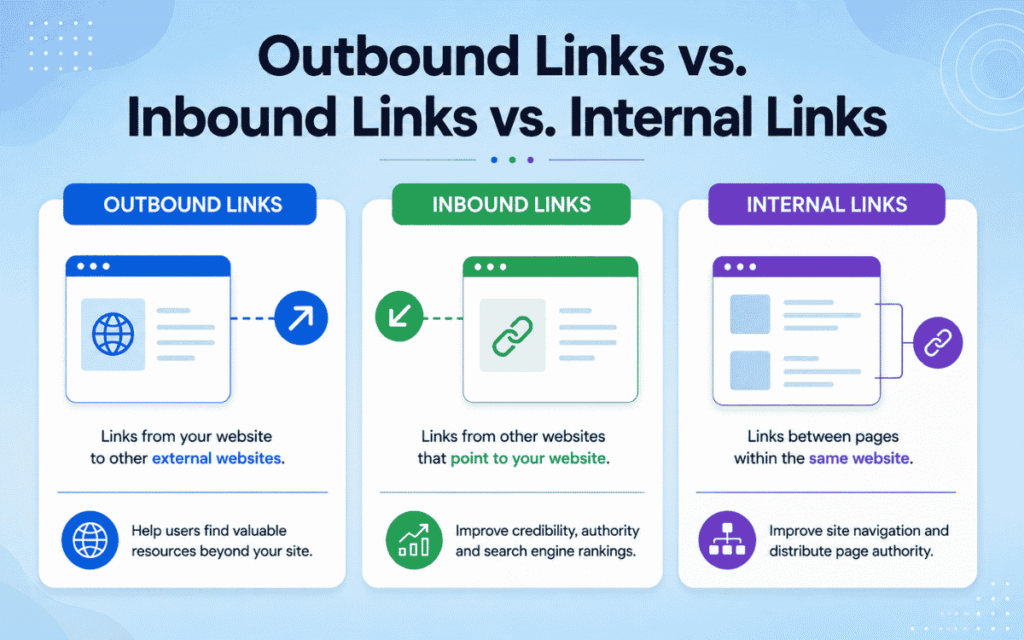
Confusing these three link types is common, so let’s clarify each one.
- Outbound links originate from your site and point to another website
- Inbound links (also called backlinks) originate from another website and point to yours
- Internal links originate from your site and point to another page on your own site
Every outbound link you create becomes an inbound link for the site receiving it. Meanwhile, internal links never leave your domain. Instead, they help visitors navigate your website and guide search engines through your site’s structure and keyword usage. Understanding this triangle of link types is foundational before you build any linking strategy.
Do Outbound Links Actually Help SEO?
This is where a lot of confusion exists. Placing outbound links on your page does not directly boost your rankings. Google’s own John Mueller has publicly stated that linking out to popular, high-authority websites provides no direct ranking benefit. This idea has circulated among SEO professionals for years, but it remains unconfirmed.
That said, outbound links in SEO still matter indirectly, and here’s why:
- They help search engines understand what your content is about and how it connects to the broader topic
- They demonstrate that you research and cite information responsibly
- They contribute to your content’s Experience, Expertise, Authoritativeness, and Trustworthiness signals, commonly known as E-E-A-T
- They improve the user experience by directing readers toward genuinely useful resources
In other words, outbound links don’t move the ranking needle by themselves. However, they support the broader signals search engines use to judge content quality. This is closely tied to how content performance is measured over time, since well-cited, trustworthy content tends to retain readers longer.
Can Outbound Links Hurt Your SEO?
Generally, outbound links are unlikely to harm your website’s SEO performance. The exception arises when you violate search engine spam guidelines.
Google treats certain outbound links as endorsements. These links pass along what’s known as “ranking credit” to the site receiving them. As a result, the following practices are considered manipulative:
- Linking to a site in exchange for that site linking back to you
- Linking to a site in exchange for payment or goods without disclosing it through a nofollow or sponsored attribute
- Hiding links so users cannot see them clearly
If you add outbound links purely to help your readers, you’re very unlikely to run into trouble. Still, it pays to be thoughtful, since every outbound link sends a visitor away from your page.
Does Linking Out Dilute Your PageRank?
Many site owners worry that outbound links “leak” their ranking power. This is a common misconception. Higher-authority pages do pass more weight to the pages they link to, but nothing is actually lost or diluted from the source page. Search engines simply weigh these endorsements based on how authoritative and trustworthy the linking page appears to be.
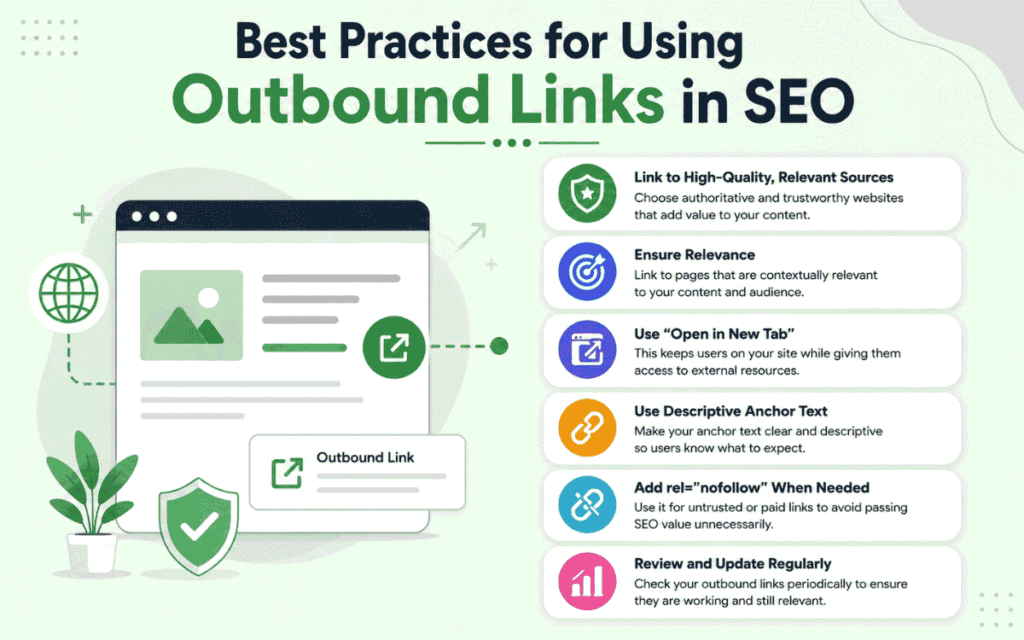
Best Practices for Using Outbound Links in SEO
Now that you understand the theory, let’s cover practical steps for using outbound links effectively.
1. Link for the Right Reasons
You should only add an outbound link for one of two reasons: to cite a credible source, or to direct readers toward genuinely useful content. Never add links purely in an attempt to manipulate rankings, either your own or someone else’s.
2. Choose Your Link Destinations Carefully
Avoid linking to direct competitors, since doing so might introduce your readers to a rival business. It can also pass ranking credit to a competing page, potentially helping them outrank you. Similarly, steer clear of low-quality or spammy websites. If you must reference a questionable source, apply a nofollow attribute so search engines understand you’re not vouching for it.
This is especially important during content audits or site migration projects, where broken or outdated outbound links often surface and need cleanup.
3. Check That Target URLs Work Properly
Before publishing, verify that every outbound link works and doesn’t redirect unnecessarily. Redirects slow down the user experience and can create confusion. Watch out for:
- Jump links that send users partway down a page instead of the intended destination
- URLs containing unnecessary tracking codes
- Link decay, which happens when a linked page moves or gets deleted over time
Regularly auditing your outbound links protects your organic traffic strategies from silently degrading due to broken references.
4. Use Nofollow Attributes Where Appropriate
Nofollow attributes tell search engines to ignore a link for ranking purposes. There are three common types:
- rel=”nofollow” signals that you don’t endorse the linked page
- rel=”sponsored” signals that the link was paid for
- rel=”ugc” signals that the link appears in user-generated content, such as comments
Failing to apply these attributes when necessary can put you at risk of violating spam guidelines, which may trigger a manual penalty.
5. Prepare Readers for Outbound Links
Sudden, unexplained links can feel jarring or spammy to readers. Instead, attach outbound links to descriptive anchor text so users know exactly where they’re headed. For example, “check out this guide on keyword research” is far clearer than a vague “click here.” Descriptive anchor text also reinforces topical relevance, which supports effective keyword usage across your page.
How Outbound Links Fit Into a Broader Link Strategy
Outbound links don’t operate in isolation. They work alongside internal links and backlinks to form a complete linking strategy. While outbound links in SEO help establish credibility, your internal linking structure keeps visitors engaged on your site longer. Meanwhile, earning quality backlinks from other websites strengthens your domain’s authority.
If you’re unsure how many backlinks your site actually needs to compete, it helps to review benchmark data on backlink quantity relative to your industry and competitors. Similarly, working with a reputable backlink-building service can complement your outbound linking efforts by strengthening the other side of the link equation.
A balanced site typically includes:
- A healthy number of outbound links pointing to authoritative, relevant sources
- Strong internal linking that connects related pages and guides site navigation
- A growing profile of quality inbound backlinks from other trustworthy domains
Neglecting any one of these three areas can weaken your overall SEO foundation.
Common Mistakes to Avoid With Outbound Links
Even experienced content creators make mistakes when it comes to outbound linking. Here are a few to watch for:
- Adding too many outbound links in a single article, which can overwhelm readers and dilute focus
- Linking exclusively to your own products or services and calling them “outbound” resources
- Forgetting to periodically check for broken or dead links
- Using generic anchor text like “click here” instead of descriptive phrases
- Linking to outdated statistics instead of the original, current source
Avoiding these pitfalls ensures your outbound links in SEO actually add value rather than create friction for your audience.
How to Analyze Your Website’s Outbound Links
Tracking your outbound links helps you catch problems before they affect user experience. Most SEO platforms let you review outbound domains, anchor text, and link status in one place. Look for:
- The total number of outbound links per page
- Which domains you link to most frequently
- Whether any outbound links are broken or redirecting
- Whether nofollow attributes are applied where necessary
Regular audits are especially useful alongside a well-maintained sitemap, since both help search engines crawl and understand your site more efficiently.
As search behavior shifts toward AI-driven answers, outbound links also play a role in how tools interpret and surface your content within AI overview results. Citing credible sources signals to both traditional search engines and generative AI tools that your content is well-researched and trustworthy.
How SurgeAIO can help in terms of SEO
Managing outbound links, internal links, and backlinks all at once can feel overwhelming, especially as your content library grows. SurgeAIO helps businesses build a complete linking strategy that balances outbound citations, internal navigation, and backlink acquisition. From auditing existing content to identifying the best content optimization tools for your workflow, SurgeAIO ensures every link on your site serves a clear purpose. Whether you need help structuring a new blog, cleaning up outdated links, or scaling your organic visibility, SurgeAIO provides the strategy and execution to get there.
Final Thoughts
Outbound links in SEO won’t single-handedly transform your rankings, but they play a meaningful supporting role. They build credibility, improve user experience, and signal to search engines that your content is thoughtfully researched. By choosing authoritative sources, using descriptive anchor text, and regularly auditing your links, you create a stronger, more trustworthy website overall. Ultimately, a thoughtful outbound linking strategy works best when paired with solid internal linking and a consistent backlink-building effort.
FAQ
What is an outbound link in SEO?
An outbound link is a hyperlink on your website that points to a different website. It’s also called an external link or outgoing link.
Do outbound links improve rankings directly?
No. Outbound links don’t directly boost your rankings. However, they support indirect ranking factors like trustworthiness, topical relevance, and E-E-A-T signals.
How many outbound links should a blog post have?
There’s no fixed number. Most well-optimized posts include a handful of relevant, high-quality outbound links rather than an excessive amount.
Should I use nofollow on all outbound links?
No. Use nofollow only for paid links, untrusted sources, or content you don’t want to endorse. Genuine citations to credible resources typically don’t need nofollow.
Can outbound links hurt my website?
Outbound links rarely hurt SEO unless they violate spam guidelines, such as link schemes or undisclosed paid links.
What’s the difference between outbound and internal links?
Outbound links send visitors to a different website, while internal links keep visitors navigating within your own site.
