A website redesign feels exciting. New visuals, better layouts, fresher branding – it all sounds like a step forward. However, many businesses discover a painful reality weeks after launch: their organic traffic has dropped significantly.
This happens because a redesign touches nearly every element that search engines rely on. URLs, content, internal links, metadata, and page speed – all of these can shift during a redesign. When they shift without proper planning, your rankings follow them downward.
The good news? You absolutely can redesign your website without losing SEO. You simply need to treat search visibility as a core requirement from day one, not an afterthought after launch.
This guide walks you through exactly how to do that.
Why Website Redesigns Often Destroy Rankings
Before you touch a single page, it helps to understand why redesigns go wrong so often.
Search engines don’t see a redesigned website as an “improved” version. They see new or altered URLs, changed content, different internal structures, and updated technical signals. Every change forces a re-evaluation. When multiple signals shift simultaneously, rankings can drop fast – and recovery can take months.
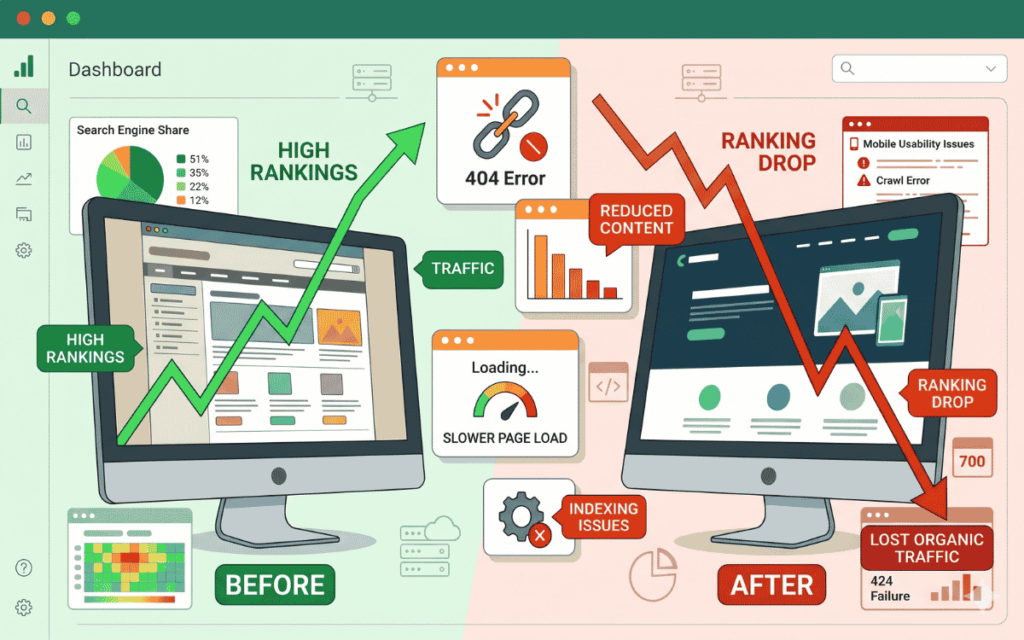
The most common culprits are:
- Missing 301 redirects when URLs change
- Removed or rewritten content on high-performing pages
- Broken internal linking after navigation restructures
- Lost metadata during CMS migration
- Slower page speed from heavy design elements
Many teams focus entirely on visual goals during a redesign. SEO gets added as a post-launch task. That sequencing is the root cause of most traffic losses after a redesign.
Understanding how long SEO takes to work after a site change helps set realistic recovery expectations – and reinforces why protecting your existing rankings is far more efficient than rebuilding them.
Step 1: Audit Everything Before You Redesign Anything
The most critical phase of learning how to redesign a website without losing SEO happens before a single design file is opened.
You need a clear picture of what your current site is doing well. Document:
- Your top organic landing pages by traffic
- Pages with strong backlink profiles
- Keywords for each important page rank
- Current conversion rates and lead-generating pages
- Your full internal linking structure
- All existing metadata (titles, descriptions, headers)
This baseline tells you what you cannot afford to break. Only about 1% of pages on any given site receive meaningful organic traffic. Those pages are disproportionately valuable – protect them first.
Also, run a complete crawl of your current site using a tool like Screaming Frog or Ahrefs. Export every indexed URL. This list becomes the foundation of your redirect map later.
Step 2: Build a Redirect Map Before Development Starts
If your redesign changes any URL – even slightly – you need a one-to-one 301 redirect mapping every old URL to its new destination.
This is where most redesigns fail technically. Teams restructure site architecture without building the redirect map first. When the new site launches, old URLs return 404 errors. Search engines drop those indexed pages. The authority and ranking signals built over the years disappear.
A few redirect rules to follow strictly:
- Map every old URL to its closest new equivalent
- Avoid redirect chains (old → intermediate → new)
- Test every redirect before launch on staging
- Submit the updated sitemap to Google Search Console immediately after launch
If you understand how important a sitemap is for SEO, you’ll know that submitting an updated one after a redesign directly supports how fast search engines re-index your new structure.
Step 3: Protect High-Value Content – Don’t Rewrite Without Data
Content is one of the strongest SEO signals on any page. During redesigns, businesses often rewrite landing pages and service pages purely for aesthetic or brand reasons – without checking whether those pages actually rank.
This is a costly mistake. A page that ranks well has earned its position through keyword relevance, content structure, and backlinks. Even small changes to headings, keyword placement, or content length can alter rankings.
Before rewriting any page, ask:
- Does this page rank for any keywords?
- Does it receive organic traffic?
- Does it have backlinks pointing to it?
If the answer to any of these is yes, preserve the core content structure. You can update visuals, improve formatting, and polish the writing – but keep the search intent alignment intact.
Understanding how many SEO keywords per page should guide your content decisions during a redesign. Removing primary keyword coverage from a page that ranks for it is one of the fastest ways to lose that position.
Step 4: Maintain Internal Linking Structure
Internal links distribute authority across your site and guide search engine crawlers to your most important pages. When navigation menus, footer links, and in-content contextual links change during a redesign, that distribution pattern breaks.
Many redesigns simplify navigation. While cleaner UX is a valid goal, removing internal links from high-authority pages reduces the ranking power of the destination pages.
Therefore, as you redesign:
- Map your current internal linking structure before changing anything
- Rebuild contextual in-content links intentionally, not just navigation menus
- Ensure your most important pages (services, products, key landing pages) receive internal links from multiple relevant pages
- Use anchor text that matches the target page’s keyword focus
A strong internal link structure also supports your local SEO strategy – especially if you operate service area pages or location-specific content that needs authority flowing to them.
Step 5: Prioritise Technical SEO During Design and Development
Visual redesigns often introduce technical issues that hurt SEO. Heavy animations, large image files, complex JavaScript frameworks, and unoptimised scripts can slow page speed significantly.
Page speed directly affects both rankings and conversions. Sites loading in one second convert three times better than those loading in five seconds. Search engines also deprioritise slow pages in competitive search results.
During the development phase, enforce these technical requirements:
- Compress all images and use modern formats like WebP
- Minimise CSS and JavaScript
- Implement lazy loading for below-the-fold content
- Ensure all pages pass Core Web Vitals benchmarks
- Design and test mobile layouts first, not as an afterthought
Google’s mobile-first indexing means the mobile version of your site is what gets evaluated for rankings. Many redesigns still treat mobile as a desktop adaptation rather than the primary experience. That approach consistently weakens post-launch SEO performance.
Step 6: Preserve Metadata Through Migration
Title tags, meta descriptions, header tags, and image alt attributes are frequently lost or duplicated during CMS migrations. When a new theme or platform overwrites existing metadata, pages lose their keyword relevance signals and click-through-rate optimisation.

Before migration, export all existing metadata into a spreadsheet. Then verify that every page in the new design retains its metadata – or receives improved metadata that still aligns with search intent.
Pay particular attention to:
- H1 tags on every page (only one per page, containing the primary keyword)
- Title tags within 60 characters
- Meta descriptions within 155 characters
- Image alt text on all important images
Strong content performance data from your existing site should guide which pages get metadata improvements versus straight preservation. Don’t optimise blindly – let current ranking data tell you what’s already working.
Step 7: Test Everything on Staging Before Going Live
Never launch a redesigned site without thorough QA on a staging environment. However, your staging environment must be properly blocked from search engines throughout testing – otherwise, Google may crawl and index incomplete or duplicate versions of your pages.
Use these controls on staging:
- Add a noindex tag to the staging environment
- Password-protect the staging URL
- Set correct robots.txt rules to block crawlers
On staging, run the following checks before approving launch:
SEO checks:
- Crawl the staging site and confirm no broken links
- Validate that all redirects function correctly
- Confirm metadata appears correctly on every page
- Verify canonical tags are properly set
- Check the indexability of all important pages
Performance checks:
- Measure load speed across key pages
- Test Core Web Vitals scores
- Validate mobile responsiveness across devices
Conversion checks:
- Test every form submission end-to-end
- Confirm thank-you pages load correctly
- Verify CRM receives submission data
- Check that GA4 events and conversions fire correctly
Step 8: Monitor Closely After Launch
The work doesn’t end at launch. Search engines take time to re-crawl and re-evaluate a redesigned site. Rankings will fluctuate – that’s normal. However, you need to distinguish normal fluctuation from signals of a real problem.
A traffic drop of under 10% is typical and usually recovers within weeks. A drop of 30–50% indicates a technical problem that needs immediate attention. Search engines can take up to six months to fully re-evaluate a redesigned site.
Monitor these metrics daily for the first four weeks post-launch:
- Organic traffic by page (compare to pre-launch baseline)
- Keyword ranking positions for your most important terms
- Crawl errors and indexation issues in Google Search Console
- Conversion rates on key lead-generating pages
- Core Web Vitals scores in Search Console
Also, resubmit your XML sitemap immediately after launch. Many businesses skip this step, which delays re-indexation and prolongs the recovery period. If you’ve made a site migration as part of your redesign, understanding SEO for a site migration in detail will help you navigate the post-launch monitoring phase effectively.
Common Mistakes That Kill SEO During Redesigns
Even well-planned redesigns can stumble. Here are the most damaging mistakes to actively avoid:
- Treating SEO as a post-launch task: SEO must influence architecture decisions from the planning phase.
- Launching without a complete redirect map: Missing even a handful of high-authority URLs can cause significant ranking loss.
- Rewriting ranking content without data review: Always check the current performance before editing any page.
- Ignoring mobile performance: Google evaluates mobile versions first – desktop-first design approaches create consistent SEO vulnerabilities.
- Skipping post-launch monitoring: Assuming the work is done at launch is how small technical issues become long-term traffic problems.
- Deleting pages without redirects: Every deleted page needs to redirect to the closest relevant alternative, not just to the homepage.
How SurgeAIO Can Help in Terms of SEO
Understanding how to redesign a website without losing SEO involves dozens of moving parts – redirects, content audits, metadata, internal linking, technical performance, and ongoing monitoring. Missing any one of them can cost you months of ranking recovery.
SurgeAIO gives you a clear, data-driven view of your SEO performance before, during, and after a redesign. You can track keyword rankings across your most important pages, identify which URLs carry the most authority, and monitor organic traffic shifts in real time after launch.
Rather than guessing whether your redesign preserved your SEO value, SurgeAIO provides the visibility to know. You can spot ranking drops early, identify which pages need attention, and respond before temporary fluctuations become long-term losses.
For businesses that also want to maintain visibility in AI-powered search results – not just traditional rankings – SurgeAIO supports both. As search engines increasingly surface AI overviews and generative answers, maintaining strong content structure and authority signals during a redesign matters more than ever.
If you’re planning a redesign, running your current site through SurgeAIO before you start gives you the baseline data you need to protect what’s working. That data should shape every decision in your redesign process.
Frequently Asked Questions
Q: Will my rankings always drop after a redesign?
Some fluctuation is normal and expected. A small temporary drop is typical during re-indexation. However, a well-planned redesign with proper redirects, preserved content, and strong technical SEO should recover quickly – often within a few weeks.
Q: How long does it take for SEO to recover after a website redesign?
Minor fluctuations typically stabilise within two to four weeks. Larger structural changes can take three to six months for full re-evaluation. Persistent drops after six weeks usually indicate a technical issue that needs investigation.
Q: Do I need to keep the same URLs during a redesign?
Wherever possible, yes. URL stability is one of the most effective ways to protect your existing rankings. When URL changes are unavoidable, implement clean one-to-one 301 redirects and validate them before launch.
Q: What happens if I remove a page during the redesign?
Every removed page should redirect to the most relevant alternative. Sending deleted pages to a generic 404 wastes the authority those pages accumulated. Redirecting to a topically relevant page passes that authority forward.
Q: Should SEO be involved from the start of a redesign or only at the end?
SEO should influence the redesign from the initial planning phase. Architecture decisions, URL structure, content strategy, and navigation design all have SEO implications. Adding SEO as a final review before launch is too late to prevent the most common mistakes.
Q: How do I know which pages are most important to protect?
Use Google Analytics and Google Search Console to identify your top organic landing pages by traffic. Also, run a backlink audit to find which pages have the most inbound links. These two factors determine which pages carry the most SEO value.
Q: Is mobile optimisation really that important for post-redesign SEO?
Absolutely. Google uses mobile-first indexing, meaning it evaluates the mobile version of your site to determine rankings. A redesign that delivers a poor mobile experience will consistently underperform in search, regardless of how well the desktop version performs.
